<?xml version="1.0" encoding="utf-8"?><feed xmlns="http://www.w3.org/2005/Atom" ><generator uri="https://jekyllrb.com/" version="4.4.1">Jekyll</generator><link href="https://harsh183.com/feed.xml" rel="self" type="application/atom+xml" /><link href="https://harsh183.com/" rel="alternate" type="text/html" /><updated>2026-05-29T03:14:03+00:00</updated><id>https://harsh183.com/feed.xml</id><title type="html">Harsh Deep</title><subtitle>Harsh likes writing code that sparks joy</subtitle><author><name>Harsh Deep</name></author><entry><title type="html">The Branch Not Taken</title><link href="https://harsh183.com/the-branch-not-taken" rel="alternate" type="text/html" title="The Branch Not Taken" /><published>2026-04-26T00:00:00+00:00</published><updated>2026-04-26T00:00:00+00:00</updated><id>https://harsh183.com/the-branch-not-taken</id><content type="html" xml:base="https://harsh183.com/the-branch-not-taken"><![CDATA[<hr />

<p>Two branches diverged in a yellow code,</p>

<p>And sorry I could not travel both</p>

<p>And be one processor, long I stalled</p>

<p>And looked down one as far as I could</p>

<p>To where it jumped in the code;</p>

<p><br /><br /></p>

<p>Then took the other, as just as fair,</p>

<p>And having perhaps the better claim,</p>

<p>Because it was truthy and wanted compare;</p>

<p>Though as for that the passing there</p>

<p>Had worn them really about the same,</p>

<p><br /><br /></p>

<p>And both that condition equally lay</p>

<p>In leaves no step had trodden black.</p>

<p>Oh, I kept the first for another day!</p>

<p>Yet knowing how way leads on to way,</p>

<p>I doubted if I should ever come back.</p>

<p><br /><br /></p>

<p>I shall be telling this with a sigh</p>

<p>Somewhere cycles and cycles hence:</p>

<p>Two branches diverged in a code, and I—</p>

<p>I took the one less traveled by,</p>

<p>And that has made all the difference.</p>

<p><br /><br /></p>

<p>~ <a href="https://en.wikipedia.org/wiki/Meltdown_%28security_vulnerability%29">Robert Meltdown</a></p>

<hr />

<p>Back in 2019, I wrote this while studying for a <a href="https://courses.grainger.illinois.edu/cs232/sp2010/lectures/L14.pdf">branch prediction</a> midterm in UIUC’s <a href="https://siebelschool.illinois.edu/academics/courses/cs233">CS 233 - Computer Architecture</a>. In general, I really adore Robert Frost’s <a href="https://www.poetryfoundation.org/poems/44272/the-road-not-taken">The Road Not Taken</a> and have often thought about it at various stages of life, alongside his other famous poem <a href="https://www.poetryfoundation.org/poems/42891/stopping-by-woods-on-a-snowy-evening">Stopping by Woods on a Snowy Evening</a>. Zenpencils has a beautiful <a href="https://www.zenpencils.com/comic/60-robert-frost-the-road-not-taken/">comic</a> version of the poem, and it’s always fun reading the rift in <a href="https://susanbaroncini-moe.com/please-stop-misinterpreting-the-road-not-taken/">interpretations</a> <a href="https://en.wikipedia.org/wiki/The_Road_Not_Taken">of</a> <a href="https://www.theparisreview.org/blog/2015/09/11/the-most-misread-poem-in-america/">the</a> poem.</p>]]></content><author><name>Harsh Deep</name></author><category term="Info" /><summary type="html"><![CDATA[Two branches diverged in a yellow code, And sorry I could not travel both And be one processor, long I stalled And looked down one as far as I could To where it jumped in the code; Then took the other, as just as fair, And having perhaps the better claim, Because it was truthy and wanted compare; Though as for that the passing there Had worn them really about the same, And both that condition equally lay In leaves no step had trodden black. Oh, I kept the first for another day! Yet knowing how way leads on to way, I doubted if I should ever come back. I shall be telling this with a sigh Somewhere cycles and cycles hence: Two branches diverged in a code, and I— I took the one less traveled by, And that has made all the difference. ~ Robert Meltdown Back in 2019, I wrote this while studying for a branch prediction midterm in UIUC’s CS 233 - Computer Architecture. In general, I really adore Robert Frost’s The Road Not Taken and have often thought about it at various stages of life, alongside his other famous poem Stopping by Woods on a Snowy Evening. Zenpencils has a beautiful comic version of the poem, and it’s always fun reading the rift in interpretations of the poem.]]></summary></entry><entry><title type="html">Advice on UIUC BS CS in 3 years</title><link href="https://harsh183.com/3-years-uiuc-cs" rel="alternate" type="text/html" title="Advice on UIUC BS CS in 3 years" /><published>2026-02-28T00:00:00+00:00</published><updated>2026-02-28T00:00:00+00:00</updated><id>https://harsh183.com/3-years-uiuc-cs</id><content type="html" xml:base="https://harsh183.com/3-years-uiuc-cs"><![CDATA[<p>Despite having graduated from UIUC a couple of years ago, I still answer lots of questions about graduating from UIUC CS in 3 years. While it sounds very accelerated, it’s totally possible for most people in the degree with the right planning. I also don’t think it’s the right idea for most people, though there are good reasons to do it. I’ll try to address both of these seemingly contradictory ideas in this post, since it’s better to make informed choices about your degree path. At a deep level, you have to be clear on what this degree means to you and how it plays into your life goals.</p>

<p>To be clear, I’m not your advisor and not a replacement for one. Please meet with them every single semester with your plan and be upfront about this. A lot of people think advisors aren’t friendly to 3-year plans, but they were actually very helpful with mine and helped me reshuffle it so it was more realistic. If you seem uncertain, they’ll guide you toward a risk-averse path, which is the right answer for most people, but showing preparedness and determination can get surprising support. That being said, feel free to email/DM me with your plan and I’ll try to give feedback.</p>

<p>Note: The info here is based on what is true at the time of writing. The CS requirements will keep changing slowly as the years go by, but the mindset will stay largely the same. Feel free to reach out or make a <a href="https://github.com/harsh183/harsh-manpage/pulls">pull request</a> if you’d like to update any information.</p>

<h2 id="think-about-3-calendar-years-or-6-semesters">Think about 3 Calendar years or 6 semesters</h2>

<p>Typically people will mean a 6 semester college plan over the typical 8, but the first thing to think about is what you are trying to optimize for</p>
<ul>
  <li>money -&gt; 6 semesters with as many credits possible</li>
  <li>time -&gt; 3 calendar years of 6 normal semesters and consider Summer classes at discount rates (see the later Summer classes section more)</li>
  <li>class time -&gt; 6 semesters with as many credits possible</li>
  <li>internship/research time -&gt; 6 semesters, with more breaks between semesters to intern more <!-- I want to expand more on the tradeoff of having less intern time, maybe I can split this out into sections, basically one less internship is one less return offer chance --></li>
</ul>

<h2 id="plan">Plan</h2>

<p>Start planning early, ideally before your first semester. This needs coordination around proficiency tests, degree requirements, and paperwork. It is still possible to do this later in your degree, but the later you start, the more stressful it gets. Make a worksheet of what every semester will include, with clearly defined classes or class groups, to ensure the whole plan works.</p>

<h3 id="understand-the-cs-and-math-main-sequence-really-well">Understand the CS and Math Main Sequence Really Well</h3>

<p>The main thing to keep in mind is making progress on the core CS sequence as quickly as possible. Once you get past 225, it unblocks a lot of chains at once, so getting there early helps a lot. Use your degree page to map out your exact sequence, but for most CS majors the common part looks like this <a href="https://en.wikipedia.org/wiki/Directed_acyclic_graph">DAG</a>:</p>

<p><img src="/assets/images/cs-and-math-uiuc-dag.png" /></p>

<p>Note: This image is made using Evan Wallace’s <a href="https://madebyevan.com/fsm/">Finite State Machine Designer</a> that you’ll definitely see in many of your UIUC classes.</p>

<ul>
  <li>I’m using double circles to indicate the terminal class in each required sequence</li>
  <li>CS classes are indicated with no number, and I’m using <code class="language-plaintext highlighter-rouge">M</code> to indicate Math classes</li>
  <li>‘con’ stands for concurrent since CS 233 normally required CS 225 unless cross registered with CS 225. I highly suggest both at once.</li>
</ul>

<p>The longest chain is length 5 in both Math and Computer Science, so ensure that you’re making strong progress toward each. This strictly forms the lower bound of how quickly you can graduate. If your goal is 6 semesters, this means you only get a single semester where you’re not progressing on the longest chain, and I recommend having that one semester be the last one, but knowing that you have some slack here can be good if a semester gets too rough. Later I’ll talk about proficiency tests, which can shorten the <a href="https://www.space.com/22437-main-sequence-star.html">main sequence</a> and get you to electives quicker.</p>

<p>In the past, prereqs weren’t as strictly enforced, so some of the older advice you will get may not apply, but often it’s still possible if you ask nicely and acknowledge to advisors, professors, and the department that this might blow up in your face. Usually this is also easier after your first semester since you can point to your strong academic record so far. I had a friend who took CS 233, 374, and 421 at the same time for their third semester, and did CS 225 alongside 126 (precursor to 128) during the second semester. I don’t recommend relying on this, but it can certainly help. Having overrides on prereqs worked well for me when I was signing up for grad classes since their enforcement is less strict and professors have far more leeway.</p>

<p>Some of these classes also have math requirements, so keep those moving too. I have seen some first-years take CS 357 and 361, but slot them in when it makes sense for your plan. This also depends on which electives you’re more interested in. For example, I wanted exposure to C and systems-level stuff for my electives, so I took CS 357 early since it aligned with my Statistics classes. I wasn’t as interested in the programming language side, so I put CS 421 toward my senior year. I had a passing interest in functional programming, but not enough to go much deeper than type inference and <code class="language-plaintext highlighter-rouge">lex</code>+<code class="language-plaintext highlighter-rouge">yacc</code>.</p>

<p>If you’re not sure what you want yet, frontload core classes so you keep more optionality and can decide more later.</p>

<h3 id="keep-the-main-math-sequence-in-mind">Keep the main math sequence in mind</h3>

<p>The Math sequence is more linear: MATH 220/221 -&gt; MATH 231 -&gt; MATH 241 -&gt; MATH 415/CS 257 -&gt; CS 357</p>

<p>Quite a lot of people come in with credit for Calc 1 (such as IB) and even credit for Calc 2 (APs, college courses), so they start further along in the sequence. Unless you went to a narrow slice of elite American and international schools, though, you’ll usually start around the beginning.</p>

<p>I suggest first trying to get through the placement/proficiency tests so you can start as far as possible based on your current knowledge. Just like the longest CS chain, you should keep making progress on this in almost every semester. Just like the main CS sequence, make progress on this every semester.</p>

<p>Some of the newer CS + X majors vary in how far you need to go in this sequence, so you might need to keep less of this in mind. However, I personally think every CS major should understand multivariate calc and linear algebra, so I strongly suggest taking them anyway unless it really gets in the way of your graduation plans. I’ve used concepts from these a lot in later classes, and they’ve often come up in my work as well.</p>

<h3 id="cs-college-of-engineering---account-for-electives">CS College of Engineering - Account For Electives</h3>

<p>If you’re in CS in the College of Engineering, you’ll have 8 electives: 6 have to be within CS, and 2 can be outside. For most people I’d still suggest doing all CS anyway since that’s what we attend university for, but go based on your interests and your semester’s overall difficulty. As soon as you’re able to, generally in your second year, start loading up on electives as they unlock. Assuming you finish CS 225+233 by the end of your third semester, you’ll have to take 3 electives for 2 more semesters and 2 electives for one semester.</p>

<p>Not all electives are equal in difficulty, so definitely keep this in mind as you slot things in.</p>

<h3 id="cs--x---frontload-your-x-classes">CS (+|&amp;) X - Frontload your X Classes</h3>

<p>There are quite a few of these majors, so I’m generalizing here, but almost all of them function kind of like a minor and don’t require too many electives beyond fulfilling a handful of groups. The X portion of your major likely also has a main sequence that’s 4-5 classes long, so you should be moving that along almost every semester too. For example, I was in CS and Statistics, so I was also pushing along my Statistics main sequence, which definitely made the earlier parts of college harder.</p>

<h3 id="cs--x---consider-cs-233--cs-341-over-cs-340--two-electives">CS (+|&amp;) X - Consider CS 233 + CS 341 over CS 340 + Two electives</h3>

<p>Not all, but many of these majors offer a choice to opt out of the harder CS 233 (Computer Architecture) and CS 341 (Systems Programming), for taking CS 340 (Introduction to Computer Systems) alongside two 400 level electives. I strongly reccomend everyone do CS 233+CS 341 despite this, and let me address a few common reasons:</p>

<ul>
  <li>Past GPA trap: The lower GPA averages of <a href="https://1010labs.org/gpa?course=CS+241&amp;semester=All">241</a> of the last decade have largely disppeared in today’s <a href="https://1010labs.org/gpa?course=CS+341&amp;semester=All">CS 341</a>, and CS <a href="https://1010labs.org/gpa?course=CS+233&amp;semester=All">233</a> has much higher averages than <a href="https://1010labs.org/gpa?course=CS+231&amp;semester=All">231</a>. While there’s still a GPA risk of a lower grade in a class with a lot of homework and content, I don’t think the risk is very significant provided your schedule has enough room to actually study and understand the material, like <em>any</em> class.</li>
  <li>
    <table>
      <tbody>
        <tr>
          <td>Faster Graduation: If you follow the CS 225+CS233 concurrent combo, then CS 341 is only one more semester anyway, so it won’t help the 3 year plan by too much. If CS225+CS340 was concurrently possible, it could be an interesting strategy to consider. In terms of saving overall time, having to take an entire additional class to make up for not taking CS 341 is definitely more work, unless the two electives selected are really easy ones. It is possible to do some of the electives before CS 340, but most are unlocked by CS 225 you’ll be taking right before anyway. However, it’s quite likely that most CS (+</td>
          <td>&amp;) X majors will take at least two electives anyway, so then it can represent less academic work to take the CS 340 pathway.</td>
        </tr>
      </tbody>
    </table>
  </li>
  <li>Easier Pathway: It is true that CS 340 spends less time on the rigourous parts of CS 233 and CS 341, and if that’s your goal this pathway is indeed easier. Personally I think things like understanding basic processor internals, assembly, systems programming, network primitives, latency/throughput tradeoffs and relatively lower level programming is quite a critical part of a great CS education, and they’re in the core sequence for the reason. I’ve found this knowledge to come to use in so many different places in my later classes, professional work, and personal interests. Depending on your own goals and interests, this might still make sense for you so spend some time understanding the differences between material. I’d start with the <a href="https://courses.grainger.illinois.edu/cs240/fa2020/static/lectures/cs240-topics.pdf">2020 document</a> detailing topic by topic comparisions of the pathway, then looking at a recent syllabus for <a href="https://cs340-schatz.com/syllabus">CS 340</a>, then compare to <a href="https://cs341.cs.illinois.edu/syllabus.html">CS 341 Syllabus</a> and <a href="https://siebelschool.illinois.edu/academics/courses/cs233">CS 233 Learning Goals</a>. The 340 syllabus page also explains the difference quite well.
    <blockquote>
      <p>This course has significant overlap with CS 233 and CS 341. CS 233 and CS 341 invest 8 credit hours in going into detail on topics that CS 340 covers in 2 credit hours. Our briefer overview is sufficient for many purposes, but leaves out details needed for hardware-aware application domains such as embedded systems and cybersecurity. The remaining credit hour in 340 explores how to use containers and service architectures to create internet applications.</p>
    </blockquote>
  </li>
</ul>

<h3 id="general-education-requirements">General Education Requirements</h3>

<p>Graduating in 3 years means making tradeoffs, and this will often be at the expense of the broad liberal arts education that large universities like UIUC are known for. Those classes are genuinely great, and it’s hard to get this kind of educational opportunity later in life, but taking high-effort gen ed classes will make 3 years more daunting. There are many UIUC classes that can count toward two or even three requirements, as well as some eight-week online forum-post style classes that are very little work.</p>

<p>Similar to the earlier sequences, the students who went to the <em>right schools (tm)</em> will have quite a few of these requirements already fulfilled, but it is still quite doable. Proficiency tests still help here for things you do have prior knowledge of.</p>

<p>Many students have the same idea, and these classes can book out quickly, so don’t have too rigid a plan for exactly when you’ll finish each requirement, as long as you’re moving along on gen eds. As you progress later in your degree, you’ll be able to register earlier, and being in the honors program also helps.</p>

<p>In terms of scheduling I suggest pushing this later in your degree because I think it’s more important to hit your core degree requirements upfront, especially for CS&amp;X/CS+X, but this can be fairly flexible. If you do have a language requirement I think it’s fine to do towards the end because it doesn’t really unlock anything too meaningful.</p>

<p>Personally I enjoyed my higher-effort comp lit classes a lot, and getting to survey new fields like linguistics, disability studies, and horticulture was great. Despite the tight timeline, you can still take many interesting gen eds, but this will always come at a cost and this is tragically a luxury.</p>

<h3 id="understand-the-relative-difficulty-of-classes-to-balance-a-semester">Understand The Relative Difficulty of Classes To Balance A Semester</h3>

<p>While planning you should have a solid idea of the rough difficulty of a given semester’s schedule because you don’t want to accidentally burn yourself out. This is a marathon, not a sprint, and having the right pacing throughout is key. For the ~5-6 real classes you’re taking each semester, aim for two hard, three medium, and one easy class. Depending on your planning, you might end up with a semester where you have three hards which you’ll have to power through.</p>

<p>Figuring out which class falls into which bucket isn’t easy. I like to approach this along these axes:</p>

<ul>
  <li>how much work a class has: homework, midterms, quizzes, MPs, team projects, readings</li>
  <li>how intellectually challenging a class is</li>
  <li>how do students typically perform</li>
  <li>past background in the class</li>
  <li>how interesting you find the class</li>
</ul>

<p>For example CS 374 didn’t take me much work a week and only had 3 exams, but it was definitely a lot of thinking each week to arrive at optimal solutions, while CS 341 wasn’t as challenging but it needed discipline as it was a lot of work each week in terms of homework with very careful debugging. I won’t suggest taking both together, but you can balance out your semesters exactly.</p>

<p>What might be easy for you might be hard for others, and you might find yourself getting humbled by a class most students consider quite easy, but generally averages across a large sample hold, so I recommend understanding data.</p>

<h4 id="gpa">GPA</h4>

<p>The first piece of data you should understand is the GPA averages for the class:</p>
<ul>
  <li><a href="https://1010labs.org/gpa">GPA++</a> - enter a class, class level or just filter by category (e.g. <code class="language-plaintext highlighter-rouge">CS 4</code>) to see gpa history by professor - developed by my uiuc roommates</li>
  <li><a href="https://waf.cs.illinois.edu/discovery/gpa/">waf.cs GPA visualizations</a> many different great data visualizations - developed in the group led by Professor Wade Fagen-Ulmschneider</li>
</ul>

<p>As someone who loves education and learning, it feels bad to talk about optimizing classes around GPA. I don’t think the point of an education is taking the easiest possible classes to get a piece of paper, but I’m also someone who overplayed my hand in the past and got burned. I think it’s possible to keep a shorter graduation timeline in mind while also learning quite a bit effectively.</p>

<h4 id="past-student-reviews">Past Student Reviews</h4>

<p>The second piece of data is more subjective, since it’s mostly from disgruntled students who can be very unreliable narrators, and it has all sorts of demographic and difficulty bias mixed in. Still, I think it’s useful for things like workload or course structure that GPA data can’t capture. Usually I’d look on:</p>

<ul>
  <li><a href="https://www.ratemyprofessors.com/">RateMyProfessors</a> - Has basically every American university on it, but the data quality is <em>really</em> bad.</li>
  <li><a href="https://www.reddit.com/r/UIUC/">r/uiuc</a> - and similar subreddits have discussion on various classes and professors. It’s a little better than RMP but not a lot better.</li>
</ul>

<p>Also make sure to filter by class since the same professor can be totally different by class, but trends across classes hold like teaching quality or friendliness. If an instructor is new to UIUC, you can often find online gossip from their previous university too.</p>

<p>UIUC also collects internal teacher evaluations called ICES, with far better completion rates and less bias toward upset students, but these are only accessible within the department. I do wish it were public since it is much better than the places I’ve linked, and there’s a good <a href="https://www.reddit.com/r/UIUC/comments/10i1ng9/why_are_ices_forms_not_public/">r/uiuc discussion about this</a>. It still suffers from a lot of the same biases I mention though.</p>

<h4 id="public-teaching-material">Public Teaching Material</h4>

<p>UIUC CS has a great culture of just publishing teaching material on the open internet, which is great for learners outside UIUC, but also students who aren’t in the class yet. In breaks before term started, I’d often just watch lectures from a past semester or read their textbooks and slide materials as a broad first pass. Depending on your experience learning the material, it is a great way to get some understanding of how hard a class might be, but I’m putting it lower in my recommendations because it’s really hard to judge without having access to the homework and exams. As a side bonus, doing this will often make the classes easier since we learn better with multiple passes.</p>

<h3 id="internalize-opportunity-costs-from-a-shorter-timeframe">Internalize Opportunity Costs From A Shorter Timeframe</h3>

<p>Many students arrive at college with a scarcity mindset when it comes to interesting things to do, since school was often a far more limited environment compared to the sheer abundance of what’s available in terms of classes, clubs, teaching, research, events, food, travel and more. 3 years is still perfectly doable while having a lot of fun side questing, but keep in mind you’ll get to do a lot less than most of your peers who are spending 4 years. While there’s an abundance of opportunity, your true scarcity is having a shorter timeframe and you should take extra care in what you take on.</p>

<p>If you start taking on too much, the opportunity cost can be your three-year plan. I actually ended up in that situation: I wanted to do lots of fun extra classes, do research and teaching almost every semester, have a really busy social life, and go deeper into an area of study that has excited me almost all my life, so I abandoned my plan toward the end of my second year. Part of my motivation was also COVID-19 taking away the in-person campus experience I enjoyed so much, so ironically I ended up spending 3 years on campus anyway.</p>

<h3 id="lean-towards-more-classes-at-once-due-to-uiucs-flat-free-structure">Lean Towards More Classes At Once Due to UIUC’s Flat Free Structure</h3>

<p>Unlike many other universities, UIUC is a fixed cost once you cross 12 credits (full-time semester), which means that you should think about sustainably overloading (&gt;18 credits) when possible because there’s no extra cost here. I was close to 18 or crossed it for many of my semesters for this reason since you’re getting more product for the same price. If any of your semesters are part-time, the tradeoffs are really different, but for a 3-year plan you’re likely taking full-time semesters.</p>

<p>I don’t recommend overloading your very first semester since university is already a huge change, and you might be living in a new city (or country) where everything is different. Advisors will usually try to stop you as well.</p>

<h3 id="credit-fillers">Credit Fillers</h3>

<p>Quite a lot of people have a large amount of pre-existing college credit coming into college, to the point of sophomore/junior by credit hours being a running <a href="https://www.reddit.com/r/UIUC/comments/9fclw7/when_a_freshman_tells_you_that_theyre_a_sophomore/">joke</a>. While many of these credits are quite useless in terms of getting to advanced classes earlier, it does save the effort of having to fluff up credit hours to graduate in 3. Not having this means taking 21.33 credits each semester which is quite a lot, and assuming you don’t overload the first semester and take 18, this leaves 22 credits overload for every single remaining semester. Actually having that kind of load with a realistic class schedule is going to be too much for most people, so you should strongly consider taking credit hours that require virtually no work just to check this box.</p>

<p>There are many options here:</p>
<ul>
  <li>at the start of your degree there might be some orientation/job training classes that take little work. For example, I had optional <a href="https://las.illinois.edu/resources/classes/las100">LAS 100 - College Success for International Students</a> that gave 2 credit hours and <a href="https://siebelschool.illinois.edu/academics/courses/cs199">CS 199 - Course Assistant Training</a> for 1 hour.</li>
  <li>many electives have a 4 credit grad version, and 3 credit undergrad version. The difference in amount of work required isn’t too large for <em>most</em> classes, so I suggest doing the grad version in those scenarios. While it’s only one extra credit at a time, these do add up. As a side bonus you do learn more and can even double count it for your UIUC Masters.</li>
  <li>8 week online-only classes where it’s practically just writing short discussion posts. I ended up learning a bit more than I anticipated and some of the readings were great, but these are definitely not at the level of a standard college class.</li>
  <li>trying some activity based easy classes like walking or vegetable gardening. Some can be deceptive though, 1 credit Ice Skating was my hardest class I’ve ever tried in my life, I regularly went to so many office hours and extra skate sessions and still ended up dropping out because I was so <em>behind</em>.</li>
  <li>CS 397/497/499 research credit. This can be a lot of work so your experience may vary, but I found it quite interesting and it didn’t really feel like work at all. I did this almost every single semester and nearly hit the departmental maximum.</li>
  <li>community college classes at places like Parkland which can be far less work, though this will cost extra money</li>
</ul>

<p>If someone doesn’t have a strong starting point in terms of the CS or Math sequence, it makes sense to be hesitant about a three year plan, but I don’t think anyone should decide against the three year plan because of the overall credit hour requirement.</p>

<h3 id="think-about-summer-classes-optional">Think about Summer Classes [Optional]</h3>

<p>If you’re strictly optimizing for cost, I’d suggest just overloading your normal semesters since that has no marginal cost. But if you’re okay with some extra cost, summer classes are worth thinking about. The cost is around half of typical tuition, so it can still win if the alternative is extra fall/spring semesters. Most students aiming to reduce costs will live in off-campus apartments, which usually run on yearly leases, so there’s no extra marginal housing cost in that case, especially since the supply of summer sublets is much higher than demand. If you just finished living in the dorms, summer sublets can also be really cheap if you look carefully.</p>

<p>Side note: I did not look carefully, trusted the wrong person, and had multiple break-ins which contributed to a <a href="https://massmail.illinois.edu/massmail/28664.html">campus massmail</a>, which in a way cost thousands in rent.</p>

<p>I think it’s also important here to think about whether your goal is 3 calendar years or a 6-semester fall/spring plan. Having these classes can definitely free up more of your regular semesters since your time in class gets closer to 8 traditional semesters, so your opportunity-cost tradeoffs get less severe and it’s a more relaxed college experience.</p>

<p>That being said, a 6-semester plan with no summer classes is perfectly doable so you don’t have to do this, but I do recommend it as a softer 3-year plan if that’s within budget and your vacations have room.</p>

<p>There are also winter classes, but it’s a very short break and these typically just get gen eds out of the way, which I don’t think is better than doing it in a normal semester, especially with the double/triple and 8-week classes that exist. I honestly liked using winters as a true guilt-free break of doing nothing and spending time with family to recharge for the next year. I also came from a part of the world with very standard daylight duration, so this helped me recover from the seasonal depression a bit.</p>

<p>With summer you have to remember that most courses are compressed to 8 weeks so it’s actually twice as fast. If you want to recharge between semesters, are doing research, are interning somewhere I suggest only taking a single class. If you’re fine with the intensity of a normal semester, take two classes. Taking more than that can be challenging so I don’t suggest it.</p>

<h2 id="proficiency--placement-tests">Proficiency &amp; Placement Tests</h2>

<p>The chain length of 5 is the main thing to tackle, and the best way to do that is starting at an earlier point. Many of you will have Math already at the earlier point, but UIUC doesn’t recognize high school level AP/IP Computer Science counting for intro so you’ll likely have to consider that to begin with, and then see whatever else you can do. Try to start out with MATH 220/221 and CS 124 out of the way so that you have chain length 4 to cover in 3 years which is far more doable.</p>

<p><a href="https://proficiency.cs.illinois.edu/">proficiency.cs.illinois.edu</a> is a great website with detailed information on the exams, and you can take the first four core sequence classes: CS 124, CS 173, CS 128, CS 225.</p>

<p>The Math department lists out their proficiency tests <a href="https://math.illinois.edu/academics/undergraduate/proficiencyexaminations">here</a> which I suggest reading. Similar to CS, you can go quite far in the core sequence: MATH 220, MATH 231, MATH 241, MATH 257.</p>

<p>Someone being able to do <em>all</em> of these is quite rare, but people can often get surprisingly far. These are free, so I suggest trying them anyway. My suggestion is to target CS 124, CS 173, and one math test from wherever you’re starting. Doing more than that is a lot to prep for over the summer. If this is winter, only target one test.</p>

<p>The right time for these tests is usually before your first semester begins, which means summer for most people. It does get in the way of that peaceful break between high school and college, but I didn’t really mind it since I had 4 months and was interning at a pretty active startup anyway. There’s also some window to do these right before the second semester and before the start of the summer term, but it’s not worth thinking about much later since these only cover early-sequence classes.</p>

<p>If you don’t prof out of these classes, your first semester will be lighter on major classes, so it’s a good time to frontload gen eds and keep the 3-year plan going.</p>

<h3 id="cs-124">CS 124</h3>

<p>If you have done high school computer science, or self learned it growing up, this is likely the right test for you. Definitely take a moment to brush up on Java and the basics of object oriented programming. There’s a public online version of the class <em>with the daily homework assignments</em> at <a href="https://www.learncs.online/">learncs.online</a> which you should complete. There’s also <a href="https://cs199emp.netlify.app/">CS 199: Even More Practice</a> that me and a few others wrote with review slides and 3 problems per session you can also do.</p>

<p>If you find this taking longer than 2 weeks or don’t really have any CS experience, I <em>strongly</em> suggest taking the class instead. Having the right CS foundation will pay dividends for the rest of your college life and future career. It will make the 3 year plan harder, so also consider if you really want to do the degree faster since having a better education is worthwhile.</p>

<p>Personally I did CS 124 anyway, though more out of a feeling of misplaced imposter syndrome, and I loved the class enormously. I went on to be part of its course staff for nearly my entire college life, won an <a href="https://siebelschool.illinois.edu/about/awards/undergraduate-scholarships-awards/outstanding-course-assistants">outstanding course assistant award</a>, made most of my college friends across several years from there and got to spend a lot of time thinking about the near future of CS education.</p>

<h3 id="cs-173">CS 173</h3>

<p>If you did high school math or self-learned topics like set theory or basic proofs, I suggest the CS 173 proficiency test too. Start by reading Professor Margaret Fleck’s amazing textbook <a href="https://mfleck.cs.illinois.edu/building-blocks/index-sp2020.html">Building Blocks for Theoretical Computer Science</a>. It’s a wonderful book that I kept going back to years after the class, and it helped me learn so much. It doesn’t assume too much background and explains all the core concepts of the class really well, so definitely familiarize yourself with it. After that, look at the <a href="https://courses.grainger.illinois.edu/cs173/fa2025/Help-info/study-resources.html">CS173 Official Study Material</a>, especially the past examlets.</p>

<p>If you find yourself not sailing through all of it, like I did, just take the class. Personally I was good with about half of the material but lacking on the rest, and I gained a lot from taking the class which helped me do well in CS 374 later and excel in my new grad interviews.</p>

<h3 id="calc-tests">Calc Tests</h3>

<p>I suggest only doing tests at a level of math you’ve already learned, but for review, check out <a href="https://tutorial.math.lamar.edu/">Paul’s Online Notes</a> for Calc I+II+III. I used them a lot as a student, and they’re very well written. I also liked the videos by <a href="https://www.khanacademy.org/math/calculus-1">Khan Academy</a>, and I think they have many practice problems too. Often when I was stuck, I used <a href="https://www.wolframalpha.com/">Wolfram Alpha’s Solver</a> (made by UIUC CS Professor <a href="https://math.illinois.edu/directory/profile/wolfram">Stephen Wolfram</a>) to cross-check while practicing.</p>

<p>My own high school credit started me at Calc II so I wasn’t too worried about it, but in hindsight I should have been starting in Calc III.</p>

<h3 id="aleks-placement-test">ALEKS Placement Test</h3>

<p>UIUC has students take the <a href="https://math.illinois.edu/academics/undergraduate/ALEKS">ALEKS PPL Mathematics Assessment Exam</a> when starting out to figure out whether they should start with Calc I or earlier. I didn’t prep at all for this since calc was very fresh for me, but I suggest doing a bit of review beforehand. If you don’t get placed into Calc I, I highly suggest taking the time to build the right math foundation in your coursework and avoiding proficiency tests for now.</p>

<h2 id="during-the-degree">During the Degree</h2>

<p>Past detailed planning and getting a good starting point through tests, now comes actually following through. How to do your degree well is a huge topic and out of scope for this post, and I’ll leave some helpful links at the end. More specific to the three-year plan, every semester make sure to:</p>

<ul>
  <li>track your degree progress against your overall plan - I did this with Google Sheets, but use whatever tool fits best for you. With every semester, things become more solidified and you can reshuffle as needed as long as you’re still good on the overall plan and main sequence. I also kept 3-year and 4-year variants of my plan, and you should plan branches accordingly.</li>
  <li>right before and after you register for classes, run a <a href="https://registrar.illinois.edu/academic-records/dars-audit/">DARS Audit</a> to ensure your academic plan is actually working</li>
  <li>go to your advisor every single semester with your plan and audit so far and the classes for the remaining semesters to get their thoughts</li>
  <li>do well in your classes, learn, and have fun!</li>
</ul>

<h2 id="reasons">Reasons</h2>

<p>Only do this plan if you have a good reason. College is designed around the 4-year cycle for a reason and the minimum degree requirements are intentionally light. If you can get the full college experience, I highly recommend it, but circumstances really vary and privilege absolutely applies. Having a good motivation driving you here will be key to being successful. Besides this <a href="https://www.reddit.com/r/UIUC/comments/17g87he/benefits_and_detriments_of_graduating_in_335_years/">nice r/uiuc thread</a>, here are my thoughts on common reasons I’ve heard:</p>

<h2 id="bad-reasons">Bad Reasons</h2>

<p>I think almost all reasons to graduate early are valid, but here are a few I’d caution against:</p>

<h3 id="peer-group">Peer group</h3>

<p>If your main motivation is seeing your friends do it and wanting to do it too, I’d suggest against that, since their circumstances might not match yours and it might be driven by pointless competitiveness. As time goes on, a lot of that peer group might end up doing 7 or 8 semesters, which is far more doable, and then you took on extra stress for nothing. It is nice to take classes in sync with your peer group, so I suggest doing that and piling on extra things once they wrap up. Many people who did three ended up living on campus for a fourth year as well, so many friends might still be around.</p>

<h3 id="personal-challenge">Personal Challenge</h3>

<p>I am always in support of people taking on a harder pathway to grow, but I’d suggest that a 4 year plan with more challenging classes, research, internships, and teaching is a far better personal challenge to grow. You can follow pretty much all of the above advice and just use the extra breathing room to go further in your interests. It’s really hard to get this kind of environment after undergrad.</p>

<h2 id="good-reasons">Good Reasons</h2>

<p>I think the primary reason to think about this is cost, but I saw many other good reasons too:</p>

<h3 id="sticker-price">Sticker Price</h3>

<p>Despite being a state university, UIUC isn’t <a href="https://www.admissions.illinois.edu/invest/tuition">cheap</a>, especially if you’re out of state and international. Besides tuition, UIUC mandates almost all first year students overspend on housing for their first two semesters through either Dorms or Private Certified Housing in a relatively affordable college town. There is a patchwork of scholarships, aid, and student jobs that can offset some of this, but that doesn’t work for most students.</p>

<p>Note: Despite aid/scholarship often not being adequate, most instate and some out of state students qualify for more than they think they realize. Information on these are really scattered but it’s really worthwhile to reduce the sticker shock of education.</p>

<p>If you are fortunate enough to afford the full four years I highly recommend it, I was extremely fortunate to be able to and that is what enabled me to take four years in college. Doing so much HCI research, taking several grad level classes, having a very broad general education, near daily social plans, getting to be part of teaching almost every semester and summer, going on endless sidequests and meeting my long term life partner happened because I had the luxury to fill it out. These were the best years of my life till that point, and I am so sentimental about my time at UIUC.</p>

<p>I think it’s wild that tax funded universities with <a href="https://www.admissions.illinois.edu/discover/history">free land</a> in a dedicated college town that doesn’t even pay the staff that well can still cost so much. Unfortunately, that is the reality of today and college debt is a burden that can really drag, even in a field with very high salaries like Computer Science.</p>

<h3 id="industry-opportunity-cost">Industry Opportunity Cost</h3>

<p>Related to the idea of a price tag, the financial opportunity cost of an entire year of working is an expense people should acknowledge as the cost of getting the full degree experience. For many people who are doing a three-year plan, their new-grad salaries can be $150k-$250k and I’ve seen a few offers like $500k. I don’t know if these kinds of offers will last long term, but at present there is a sizable sum of money that people are walking away from. In a long career of 40-50 years and compounded growth, it might not amount to a large portion of overall net worth, but it is a <em>lot</em> of money nevertheless. This one year’s pay can become a large part of adequate retirement savings depending on the circumstances of retirement.</p>

<h3 id="doing-a-combined-masters">Doing A Combined Masters</h3>

<p>I knew many people who did a 3+1 BS+MS program, which let them graduate at the same time as their typical cohort, have the same number of internships, and walk out with a nicer degree. While most CS-related jobs no longer have a <em>huge</em> boost for doing a master’s like in the past, it’s still a sizable bump in many cases, and not having to take a career break for one is really nice. Access to classes is quite similar to undergrad, but getting a whole extra degree for taking a full schedule of 4 years of CS classes is nice. Many CS degrees don’t have an explicit 3+1 program, but generally you can just apply for a master’s like normal and get in through some combination of connections and home-field bias.</p>

<p>This can actually work out cheaper than a normal 4-year degree too, because grad-school teaching and research positions often come with tuition waivers and stipends, while the undergrad equivalents barely hit minimum wage and don’t offer as many hours. Many people I know got to experience 4 years at UIUC more cheaply because of this, though it’d be nice if undergrads were given the same level of waivers like some <a href="https://eecsdsstaff.org/know-your-rights/fee-remission/">universities do</a>.</p>

<p>Note for F1 Visa: keep in mind doing a combined program for 4 years will skip the 3 years of OPT (1 year normal + 2 years STEM), which means less time in industry and lottery attempts if that is your goal. If you’re targeting academia this is fine, but just keep this caveat in mind.</p>

<h3 id="starting-grad-school-earlier">Starting Grad School Earlier</h3>

<p>As an undergrad, UIUC enables you to get a grad student-like experience with teaching, research, grants, publishing and upper div classes, but why not just become a graduate student earlier if you’re really sure about your path. Being a grad student explicitly makes it easier, and having an extra year to focus on research can really produce better outcomes for many students. I still recommend spending the full time in undergrad to explore if being a grad student is the right move and not getting locked into the wrong research area, but getting there a year earlier can be nice. If you also intended to do a PhD at UIUC, this can be quite streamlined since you can double dip the initial breadth requirements from undergrad too.</p>

<h3 id="study-abroad">Study Abroad</h3>

<p>Studying in a different country is an extremely worthwhile experience and it really forces you to grow in all sorts of great ways. It’s also just fascinating seeing how different cultures approach the same topics, even a relatively standardized field like Computer Science. Having fewer semesters at UIUC means you could do an 8 or even 12 month study abroad if you wanted. A funny side effect is that you can even save money doing this because universities in other developed countries are much cheaper than American ones. For most people, this is a great chance in life to just spend a few months living in another country that won’t naturally come up again in life.</p>

<p>I didn’t do this personally because my entire UIUC experience was already <em>studying abroad</em>, but I knew international students who used it to try even more countries.</p>

<h3 id="industry-internships">Industry Internships</h3>

<p>While doing part-time semester internships and full-time 3-5 summer internships in a normal 4-year/8-semester plan is already quite a lot of room for internships, doing this can let you do even more. Especially towards the end of a degree. Typically there’s a lot of burden on the summer after junior year’s internship to net a return offer, but having a spring or fall co-op/full-time internship right before graduation can increase the odds of a full-time return offer quite drastically. Interning is also just a fantastic learning experience: mentorship, sampling different industries, relatively lower stakes for career mistakes, trying different tech stacks. This can also help on the money front, I knew someone who covered the gap between scholarships and tuition with savings from numerous internships.</p>

<p>Also keep in mind that UIUC’s <a href="https://researchpark.illinois.edu/">Research Park</a>, Champaign county tech offices, and Chicago <a href="https://cityscholars.grainger.illinois.edu/">City Scholars</a> can let you intern around while taking proper semesters too, though it can be a little tough to balance both so I suggest lighter loads.</p>

<h3 id="not-liking-university-or-wanting-to-spend-less-time-here">Not Liking University or Wanting to Spend Less Time Here</h3>

<p>Some people don’t like life in academia. Others miss family that’s often in a different city, state, or country, don’t find the right social crowd, or simply want to get their education and resume life back home. Whatever someone’s reason, I think it’s valid, even though I’d love it if everyone wanted to spend a long time at UIUC and experience what I did. Time is a very precious resource, and if less time at UIUC aligns with your goals, I think that is absolutely worth it.</p>

<h2 id="middle-ground-7-semesters">Middle ground: 7 semesters</h2>

<p>While 6 semesters is a little tight, 7 actually gives far more breathing room in the degree plan and it can still save money. Your 7th semester can also be a part-time semester, which is cheaper to do, and this allows a longer college experience, one more summer break, and often a longer break between a job start and the end of college. UIUC will still let you do the May graduation ceremony even if you <a href="https://commencement.illinois.edu/eligibility/">graduate in December</a>. UIUC’s typical degree plans also account for 7 semesters to allow for some slack in case of life circumstances, co-op/internships, and study abroad so it feels quite manageable.</p>

<p>Note for F1 Visa: If you graduate in December keep in mind it reduces the lottery attempts from 4 to 3 for the duration of an OPT. It might seem small from afar, but I’ve seen people <em>really</em> regret this.</p>

<h2 id="links">Links</h2>

<p>These are largely out of scope for this page, but I think they’re also worth checking out:</p>

<ul>
  <li>My guide on <a href="/productive">Staying Productive</a> - a lot of different strategies you should A/B test on to be highly effective</li>
  <li><a href="https://www.drshika.com/">Drshika Asher</a>’s <a href="https://uiuc-mh-resources.netlify.app/">UIUC Mental Health Sources Links Collection</a></li>
  <li>Drshika and I also wrote a SWE interview <a href="https://tinyurl.com/cs-interview-prep">prep guide</a> which is about prepping for DS&amp;A style algorithms effectively while using time well from when we were CS 225 CAs</li>
  <li><a href="https://www.grahamallcott.com/books/study-ninja">How to Be a Study Ninja</a> by Graham Allcott is one of the rare self-help advice books on doing really well as a student that I suggest. Most of this field has very vague advice that doesn’t work, but this book is really actionable and chances are you’re already doing some of it</li>
  <li>Drshika, <a href="https://www.linkedin.com/in/monicapara/">Monika Para</a>, and I also ran a summer series of follow along workshops focused on a fun and friendly start to side projects called <a href="https://sosp22.com/">Summer of Side Projects</a>. Go through these tutorials and then use it as a fun launching point to quickly explore your interests and build up a nice portfolio.</li>
  <li><a href="https://sosp22.com/testing101">Testing 101</a> is a small guide I wrote on the red-green-refactor mindset on having clear failing tests, working in small increments till each piece works, and then using that as a way to prevent regressions while building more code on top. The topic of programming productivity is a really complex one, but the main trend I noticed among successful students as a course assistant was the ones who worked in small increments, tested those increments, and debugged very quickly because there was only a small portion of unconfirmed code in most cases. Doing a 3 year plan does mean learning to work effectively and I think this is a good starter point.</li>
</ul>

<p>Good luck!</p>

<p>Thanks to Monika Para, Drshika Asher, Divvyam Arora, and Davis Keene for taking an early look at this post.</p>]]></content><author><name>Harsh Deep</name></author><category term="Info" /><summary type="html"><![CDATA[Despite having graduated from UIUC a couple of years ago, I still answer lots of questions about graduating from UIUC CS in 3 years. While it sounds very accelerated, it’s totally possible for most people in the degree with the right planning. I also don’t think it’s the right idea for most people, though there are good reasons to do it. I’ll try to address both of these seemingly contradictory ideas in this post, since it’s better to make informed choices about your degree path. At a deep level, you have to be clear on what this degree means to you and how it plays into your life goals. To be clear, I’m not your advisor and not a replacement for one. Please meet with them every single semester with your plan and be upfront about this. A lot of people think advisors aren’t friendly to 3-year plans, but they were actually very helpful with mine and helped me reshuffle it so it was more realistic. If you seem uncertain, they’ll guide you toward a risk-averse path, which is the right answer for most people, but showing preparedness and determination can get surprising support. That being said, feel free to email/DM me with your plan and I’ll try to give feedback. Note: The info here is based on what is true at the time of writing. The CS requirements will keep changing slowly as the years go by, but the mindset will stay largely the same. Feel free to reach out or make a pull request if you’d like to update any information. Think about 3 Calendar years or 6 semesters Typically people will mean a 6 semester college plan over the typical 8, but the first thing to think about is what you are trying to optimize for money -&gt; 6 semesters with as many credits possible time -&gt; 3 calendar years of 6 normal semesters and consider Summer classes at discount rates (see the later Summer classes section more) class time -&gt; 6 semesters with as many credits possible internship/research time -&gt; 6 semesters, with more breaks between semesters to intern more Plan Start planning early, ideally before your first semester. This needs coordination around proficiency tests, degree requirements, and paperwork. It is still possible to do this later in your degree, but the later you start, the more stressful it gets. Make a worksheet of what every semester will include, with clearly defined classes or class groups, to ensure the whole plan works. Understand the CS and Math Main Sequence Really Well The main thing to keep in mind is making progress on the core CS sequence as quickly as possible. Once you get past 225, it unblocks a lot of chains at once, so getting there early helps a lot. Use your degree page to map out your exact sequence, but for most CS majors the common part looks like this DAG: Note: This image is made using Evan Wallace’s Finite State Machine Designer that you’ll definitely see in many of your UIUC classes. I’m using double circles to indicate the terminal class in each required sequence CS classes are indicated with no number, and I’m using M to indicate Math classes ‘con’ stands for concurrent since CS 233 normally required CS 225 unless cross registered with CS 225. I highly suggest both at once. The longest chain is length 5 in both Math and Computer Science, so ensure that you’re making strong progress toward each. This strictly forms the lower bound of how quickly you can graduate. If your goal is 6 semesters, this means you only get a single semester where you’re not progressing on the longest chain, and I recommend having that one semester be the last one, but knowing that you have some slack here can be good if a semester gets too rough. Later I’ll talk about proficiency tests, which can shorten the main sequence and get you to electives quicker. In the past, prereqs weren’t as strictly enforced, so some of the older advice you will get may not apply, but often it’s still possible if you ask nicely and acknowledge to advisors, professors, and the department that this might blow up in your face. Usually this is also easier after your first semester since you can point to your strong academic record so far. I had a friend who took CS 233, 374, and 421 at the same time for their third semester, and did CS 225 alongside 126 (precursor to 128) during the second semester. I don’t recommend relying on this, but it can certainly help. Having overrides on prereqs worked well for me when I was signing up for grad classes since their enforcement is less strict and professors have far more leeway. Some of these classes also have math requirements, so keep those moving too. I have seen some first-years take CS 357 and 361, but slot them in when it makes sense for your plan. This also depends on which electives you’re more interested in. For example, I wanted exposure to C and systems-level stuff for my electives, so I took CS 357 early since it aligned with my Statistics classes. I wasn’t as interested in the programming language side, so I put CS 421 toward my senior year. I had a passing interest in functional programming, but not enough to go much deeper than type inference and lex+yacc. If you’re not sure what you want yet, frontload core classes so you keep more optionality and can decide more later. Keep the main math sequence in mind The Math sequence is more linear: MATH 220/221 -&gt; MATH 231 -&gt; MATH 241 -&gt; MATH 415/CS 257 -&gt; CS 357 Quite a lot of people come in with credit for Calc 1 (such as IB) and even credit for Calc 2 (APs, college courses), so they start further along in the sequence. Unless you went to a narrow slice of elite American and international schools, though, you’ll usually start around the beginning. I suggest first trying to get through the placement/proficiency tests so you can start as far as possible based on your current knowledge. Just like the longest CS chain, you should keep making progress on this in almost every semester. Just like the main CS sequence, make progress on this every semester. Some of the newer CS + X majors vary in how far you need to go in this sequence, so you might need to keep less of this in mind. However, I personally think every CS major should understand multivariate calc and linear algebra, so I strongly suggest taking them anyway unless it really gets in the way of your graduation plans. I’ve used concepts from these a lot in later classes, and they’ve often come up in my work as well. CS College of Engineering - Account For Electives If you’re in CS in the College of Engineering, you’ll have 8 electives: 6 have to be within CS, and 2 can be outside. For most people I’d still suggest doing all CS anyway since that’s what we attend university for, but go based on your interests and your semester’s overall difficulty. As soon as you’re able to, generally in your second year, start loading up on electives as they unlock. Assuming you finish CS 225+233 by the end of your third semester, you’ll have to take 3 electives for 2 more semesters and 2 electives for one semester. Not all electives are equal in difficulty, so definitely keep this in mind as you slot things in. CS (+|&amp;) X - Frontload your X Classes There are quite a few of these majors, so I’m generalizing here, but almost all of them function kind of like a minor and don’t require too many electives beyond fulfilling a handful of groups. The X portion of your major likely also has a main sequence that’s 4-5 classes long, so you should be moving that along almost every semester too. For example, I was in CS and Statistics, so I was also pushing along my Statistics main sequence, which definitely made the earlier parts of college harder. CS (+|&amp;) X - Consider CS 233 + CS 341 over CS 340 + Two electives Not all, but many of these majors offer a choice to opt out of the harder CS 233 (Computer Architecture) and CS 341 (Systems Programming), for taking CS 340 (Introduction to Computer Systems) alongside two 400 level electives. I strongly reccomend everyone do CS 233+CS 341 despite this, and let me address a few common reasons: Past GPA trap: The lower GPA averages of 241 of the last decade have largely disppeared in today’s CS 341, and CS 233 has much higher averages than 231. While there’s still a GPA risk of a lower grade in a class with a lot of homework and content, I don’t think the risk is very significant provided your schedule has enough room to actually study and understand the material, like any class. Faster Graduation: If you follow the CS 225+CS233 concurrent combo, then CS 341 is only one more semester anyway, so it won’t help the 3 year plan by too much. If CS225+CS340 was concurrently possible, it could be an interesting strategy to consider. In terms of saving overall time, having to take an entire additional class to make up for not taking CS 341 is definitely more work, unless the two electives selected are really easy ones. It is possible to do some of the electives before CS 340, but most are unlocked by CS 225 you’ll be taking right before anyway. However, it’s quite likely that most CS (+ &amp;) X majors will take at least two electives anyway, so then it can represent less academic work to take the CS 340 pathway. Easier Pathway: It is true that CS 340 spends less time on the rigourous parts of CS 233 and CS 341, and if that’s your goal this pathway is indeed easier. Personally I think things like understanding basic processor internals, assembly, systems programming, network primitives, latency/throughput tradeoffs and relatively lower level programming is quite a critical part of a great CS education, and they’re in the core sequence for the reason. I’ve found this knowledge to come to use in so many different places in my later classes, professional work, and personal interests. Depending on your own goals and interests, this might still make sense for you so spend some time understanding the differences between material. I’d start with the 2020 document detailing topic by topic comparisions of the pathway, then looking at a recent syllabus for CS 340, then compare to CS 341 Syllabus and CS 233 Learning Goals. The 340 syllabus page also explains the difference quite well. This course has significant overlap with CS 233 and CS 341. CS 233 and CS 341 invest 8 credit hours in going into detail on topics that CS 340 covers in 2 credit hours. Our briefer overview is sufficient for many purposes, but leaves out details needed for hardware-aware application domains such as embedded systems and cybersecurity. The remaining credit hour in 340 explores how to use containers and service architectures to create internet applications. General Education Requirements Graduating in 3 years means making tradeoffs, and this will often be at the expense of the broad liberal arts education that large universities like UIUC are known for. Those classes are genuinely great, and it’s hard to get this kind of educational opportunity later in life, but taking high-effort gen ed classes will make 3 years more daunting. There are many UIUC classes that can count toward two or even three requirements, as well as some eight-week online forum-post style classes that are very little work. Similar to the earlier sequences, the students who went to the right schools (tm) will have quite a few of these requirements already fulfilled, but it is still quite doable. Proficiency tests still help here for things you do have prior knowledge of. Many students have the same idea, and these classes can book out quickly, so don’t have too rigid a plan for exactly when you’ll finish each requirement, as long as you’re moving along on gen eds. As you progress later in your degree, you’ll be able to register earlier, and being in the honors program also helps. In terms of scheduling I suggest pushing this later in your degree because I think it’s more important to hit your core degree requirements upfront, especially for CS&amp;X/CS+X, but this can be fairly flexible. If you do have a language requirement I think it’s fine to do towards the end because it doesn’t really unlock anything too meaningful. Personally I enjoyed my higher-effort comp lit classes a lot, and getting to survey new fields like linguistics, disability studies, and horticulture was great. Despite the tight timeline, you can still take many interesting gen eds, but this will always come at a cost and this is tragically a luxury. Understand The Relative Difficulty of Classes To Balance A Semester While planning you should have a solid idea of the rough difficulty of a given semester’s schedule because you don’t want to accidentally burn yourself out. This is a marathon, not a sprint, and having the right pacing throughout is key. For the ~5-6 real classes you’re taking each semester, aim for two hard, three medium, and one easy class. Depending on your planning, you might end up with a semester where you have three hards which you’ll have to power through. Figuring out which class falls into which bucket isn’t easy. I like to approach this along these axes: how much work a class has: homework, midterms, quizzes, MPs, team projects, readings how intellectually challenging a class is how do students typically perform past background in the class how interesting you find the class For example CS 374 didn’t take me much work a week and only had 3 exams, but it was definitely a lot of thinking each week to arrive at optimal solutions, while CS 341 wasn’t as challenging but it needed discipline as it was a lot of work each week in terms of homework with very careful debugging. I won’t suggest taking both together, but you can balance out your semesters exactly. What might be easy for you might be hard for others, and you might find yourself getting humbled by a class most students consider quite easy, but generally averages across a large sample hold, so I recommend understanding data. GPA The first piece of data you should understand is the GPA averages for the class: GPA++ - enter a class, class level or just filter by category (e.g. CS 4) to see gpa history by professor - developed by my uiuc roommates waf.cs GPA visualizations many different great data visualizations - developed in the group led by Professor Wade Fagen-Ulmschneider As someone who loves education and learning, it feels bad to talk about optimizing classes around GPA. I don’t think the point of an education is taking the easiest possible classes to get a piece of paper, but I’m also someone who overplayed my hand in the past and got burned. I think it’s possible to keep a shorter graduation timeline in mind while also learning quite a bit effectively. Past Student Reviews The second piece of data is more subjective, since it’s mostly from disgruntled students who can be very unreliable narrators, and it has all sorts of demographic and difficulty bias mixed in. Still, I think it’s useful for things like workload or course structure that GPA data can’t capture. Usually I’d look on: RateMyProfessors - Has basically every American university on it, but the data quality is really bad. r/uiuc - and similar subreddits have discussion on various classes and professors. It’s a little better than RMP but not a lot better. Also make sure to filter by class since the same professor can be totally different by class, but trends across classes hold like teaching quality or friendliness. If an instructor is new to UIUC, you can often find online gossip from their previous university too. UIUC also collects internal teacher evaluations called ICES, with far better completion rates and less bias toward upset students, but these are only accessible within the department. I do wish it were public since it is much better than the places I’ve linked, and there’s a good r/uiuc discussion about this. It still suffers from a lot of the same biases I mention though. Public Teaching Material UIUC CS has a great culture of just publishing teaching material on the open internet, which is great for learners outside UIUC, but also students who aren’t in the class yet. In breaks before term started, I’d often just watch lectures from a past semester or read their textbooks and slide materials as a broad first pass. Depending on your experience learning the material, it is a great way to get some understanding of how hard a class might be, but I’m putting it lower in my recommendations because it’s really hard to judge without having access to the homework and exams. As a side bonus, doing this will often make the classes easier since we learn better with multiple passes. Internalize Opportunity Costs From A Shorter Timeframe Many students arrive at college with a scarcity mindset when it comes to interesting things to do, since school was often a far more limited environment compared to the sheer abundance of what’s available in terms of classes, clubs, teaching, research, events, food, travel and more. 3 years is still perfectly doable while having a lot of fun side questing, but keep in mind you’ll get to do a lot less than most of your peers who are spending 4 years. While there’s an abundance of opportunity, your true scarcity is having a shorter timeframe and you should take extra care in what you take on. If you start taking on too much, the opportunity cost can be your three-year plan. I actually ended up in that situation: I wanted to do lots of fun extra classes, do research and teaching almost every semester, have a really busy social life, and go deeper into an area of study that has excited me almost all my life, so I abandoned my plan toward the end of my second year. Part of my motivation was also COVID-19 taking away the in-person campus experience I enjoyed so much, so ironically I ended up spending 3 years on campus anyway. Lean Towards More Classes At Once Due to UIUC’s Flat Free Structure Unlike many other universities, UIUC is a fixed cost once you cross 12 credits (full-time semester), which means that you should think about sustainably overloading (&gt;18 credits) when possible because there’s no extra cost here. I was close to 18 or crossed it for many of my semesters for this reason since you’re getting more product for the same price. If any of your semesters are part-time, the tradeoffs are really different, but for a 3-year plan you’re likely taking full-time semesters. I don’t recommend overloading your very first semester since university is already a huge change, and you might be living in a new city (or country) where everything is different. Advisors will usually try to stop you as well. Credit Fillers Quite a lot of people have a large amount of pre-existing college credit coming into college, to the point of sophomore/junior by credit hours being a running joke. While many of these credits are quite useless in terms of getting to advanced classes earlier, it does save the effort of having to fluff up credit hours to graduate in 3. Not having this means taking 21.33 credits each semester which is quite a lot, and assuming you don’t overload the first semester and take 18, this leaves 22 credits overload for every single remaining semester. Actually having that kind of load with a realistic class schedule is going to be too much for most people, so you should strongly consider taking credit hours that require virtually no work just to check this box. There are many options here: at the start of your degree there might be some orientation/job training classes that take little work. For example, I had optional LAS 100 - College Success for International Students that gave 2 credit hours and CS 199 - Course Assistant Training for 1 hour. many electives have a 4 credit grad version, and 3 credit undergrad version. The difference in amount of work required isn’t too large for most classes, so I suggest doing the grad version in those scenarios. While it’s only one extra credit at a time, these do add up. As a side bonus you do learn more and can even double count it for your UIUC Masters. 8 week online-only classes where it’s practically just writing short discussion posts. I ended up learning a bit more than I anticipated and some of the readings were great, but these are definitely not at the level of a standard college class. trying some activity based easy classes like walking or vegetable gardening. Some can be deceptive though, 1 credit Ice Skating was my hardest class I’ve ever tried in my life, I regularly went to so many office hours and extra skate sessions and still ended up dropping out because I was so behind. CS 397/497/499 research credit. This can be a lot of work so your experience may vary, but I found it quite interesting and it didn’t really feel like work at all. I did this almost every single semester and nearly hit the departmental maximum. community college classes at places like Parkland which can be far less work, though this will cost extra money If someone doesn’t have a strong starting point in terms of the CS or Math sequence, it makes sense to be hesitant about a three year plan, but I don’t think anyone should decide against the three year plan because of the overall credit hour requirement. Think about Summer Classes [Optional] If you’re strictly optimizing for cost, I’d suggest just overloading your normal semesters since that has no marginal cost. But if you’re okay with some extra cost, summer classes are worth thinking about. The cost is around half of typical tuition, so it can still win if the alternative is extra fall/spring semesters. Most students aiming to reduce costs will live in off-campus apartments, which usually run on yearly leases, so there’s no extra marginal housing cost in that case, especially since the supply of summer sublets is much higher than demand. If you just finished living in the dorms, summer sublets can also be really cheap if you look carefully. Side note: I did not look carefully, trusted the wrong person, and had multiple break-ins which contributed to a campus massmail, which in a way cost thousands in rent. I think it’s also important here to think about whether your goal is 3 calendar years or a 6-semester fall/spring plan. Having these classes can definitely free up more of your regular semesters since your time in class gets closer to 8 traditional semesters, so your opportunity-cost tradeoffs get less severe and it’s a more relaxed college experience. That being said, a 6-semester plan with no summer classes is perfectly doable so you don’t have to do this, but I do recommend it as a softer 3-year plan if that’s within budget and your vacations have room. There are also winter classes, but it’s a very short break and these typically just get gen eds out of the way, which I don’t think is better than doing it in a normal semester, especially with the double/triple and 8-week classes that exist. I honestly liked using winters as a true guilt-free break of doing nothing and spending time with family to recharge for the next year. I also came from a part of the world with very standard daylight duration, so this helped me recover from the seasonal depression a bit. With summer you have to remember that most courses are compressed to 8 weeks so it’s actually twice as fast. If you want to recharge between semesters, are doing research, are interning somewhere I suggest only taking a single class. If you’re fine with the intensity of a normal semester, take two classes. Taking more than that can be challenging so I don’t suggest it. Proficiency &amp; Placement Tests The chain length of 5 is the main thing to tackle, and the best way to do that is starting at an earlier point. Many of you will have Math already at the earlier point, but UIUC doesn’t recognize high school level AP/IP Computer Science counting for intro so you’ll likely have to consider that to begin with, and then see whatever else you can do. Try to start out with MATH 220/221 and CS 124 out of the way so that you have chain length 4 to cover in 3 years which is far more doable. proficiency.cs.illinois.edu is a great website with detailed information on the exams, and you can take the first four core sequence classes: CS 124, CS 173, CS 128, CS 225. The Math department lists out their proficiency tests here which I suggest reading. Similar to CS, you can go quite far in the core sequence: MATH 220, MATH 231, MATH 241, MATH 257. Someone being able to do all of these is quite rare, but people can often get surprisingly far. These are free, so I suggest trying them anyway. My suggestion is to target CS 124, CS 173, and one math test from wherever you’re starting. Doing more than that is a lot to prep for over the summer. If this is winter, only target one test. The right time for these tests is usually before your first semester begins, which means summer for most people. It does get in the way of that peaceful break between high school and college, but I didn’t really mind it since I had 4 months and was interning at a pretty active startup anyway. There’s also some window to do these right before the second semester and before the start of the summer term, but it’s not worth thinking about much later since these only cover early-sequence classes. If you don’t prof out of these classes, your first semester will be lighter on major classes, so it’s a good time to frontload gen eds and keep the 3-year plan going. CS 124 If you have done high school computer science, or self learned it growing up, this is likely the right test for you. Definitely take a moment to brush up on Java and the basics of object oriented programming. There’s a public online version of the class with the daily homework assignments at learncs.online which you should complete. There’s also CS 199: Even More Practice that me and a few others wrote with review slides and 3 problems per session you can also do. If you find this taking longer than 2 weeks or don’t really have any CS experience, I strongly suggest taking the class instead. Having the right CS foundation will pay dividends for the rest of your college life and future career. It will make the 3 year plan harder, so also consider if you really want to do the degree faster since having a better education is worthwhile. Personally I did CS 124 anyway, though more out of a feeling of misplaced imposter syndrome, and I loved the class enormously. I went on to be part of its course staff for nearly my entire college life, won an outstanding course assistant award, made most of my college friends across several years from there and got to spend a lot of time thinking about the near future of CS education. CS 173 If you did high school math or self-learned topics like set theory or basic proofs, I suggest the CS 173 proficiency test too. Start by reading Professor Margaret Fleck’s amazing textbook Building Blocks for Theoretical Computer Science. It’s a wonderful book that I kept going back to years after the class, and it helped me learn so much. It doesn’t assume too much background and explains all the core concepts of the class really well, so definitely familiarize yourself with it. After that, look at the CS173 Official Study Material, especially the past examlets. If you find yourself not sailing through all of it, like I did, just take the class. Personally I was good with about half of the material but lacking on the rest, and I gained a lot from taking the class which helped me do well in CS 374 later and excel in my new grad interviews. Calc Tests I suggest only doing tests at a level of math you’ve already learned, but for review, check out Paul’s Online Notes for Calc I+II+III. I used them a lot as a student, and they’re very well written. I also liked the videos by Khan Academy, and I think they have many practice problems too. Often when I was stuck, I used Wolfram Alpha’s Solver (made by UIUC CS Professor Stephen Wolfram) to cross-check while practicing. My own high school credit started me at Calc II so I wasn’t too worried about it, but in hindsight I should have been starting in Calc III. ALEKS Placement Test UIUC has students take the ALEKS PPL Mathematics Assessment Exam when starting out to figure out whether they should start with Calc I or earlier. I didn’t prep at all for this since calc was very fresh for me, but I suggest doing a bit of review beforehand. If you don’t get placed into Calc I, I highly suggest taking the time to build the right math foundation in your coursework and avoiding proficiency tests for now. During the Degree Past detailed planning and getting a good starting point through tests, now comes actually following through. How to do your degree well is a huge topic and out of scope for this post, and I’ll leave some helpful links at the end. More specific to the three-year plan, every semester make sure to: track your degree progress against your overall plan - I did this with Google Sheets, but use whatever tool fits best for you. With every semester, things become more solidified and you can reshuffle as needed as long as you’re still good on the overall plan and main sequence. I also kept 3-year and 4-year variants of my plan, and you should plan branches accordingly. right before and after you register for classes, run a DARS Audit to ensure your academic plan is actually working go to your advisor every single semester with your plan and audit so far and the classes for the remaining semesters to get their thoughts do well in your classes, learn, and have fun! Reasons Only do this plan if you have a good reason. College is designed around the 4-year cycle for a reason and the minimum degree requirements are intentionally light. If you can get the full college experience, I highly recommend it, but circumstances really vary and privilege absolutely applies. Having a good motivation driving you here will be key to being successful. Besides this nice r/uiuc thread, here are my thoughts on common reasons I’ve heard: Bad Reasons I think almost all reasons to graduate early are valid, but here are a few I’d caution against: Peer group If your main motivation is seeing your friends do it and wanting to do it too, I’d suggest against that, since their circumstances might not match yours and it might be driven by pointless competitiveness. As time goes on, a lot of that peer group might end up doing 7 or 8 semesters, which is far more doable, and then you took on extra stress for nothing. It is nice to take classes in sync with your peer group, so I suggest doing that and piling on extra things once they wrap up. Many people who did three ended up living on campus for a fourth year as well, so many friends might still be around. Personal Challenge I am always in support of people taking on a harder pathway to grow, but I’d suggest that a 4 year plan with more challenging classes, research, internships, and teaching is a far better personal challenge to grow. You can follow pretty much all of the above advice and just use the extra breathing room to go further in your interests. It’s really hard to get this kind of environment after undergrad. Good Reasons I think the primary reason to think about this is cost, but I saw many other good reasons too: Sticker Price Despite being a state university, UIUC isn’t cheap, especially if you’re out of state and international. Besides tuition, UIUC mandates almost all first year students overspend on housing for their first two semesters through either Dorms or Private Certified Housing in a relatively affordable college town. There is a patchwork of scholarships, aid, and student jobs that can offset some of this, but that doesn’t work for most students. Note: Despite aid/scholarship often not being adequate, most instate and some out of state students qualify for more than they think they realize. Information on these are really scattered but it’s really worthwhile to reduce the sticker shock of education. If you are fortunate enough to afford the full four years I highly recommend it, I was extremely fortunate to be able to and that is what enabled me to take four years in college. Doing so much HCI research, taking several grad level classes, having a very broad general education, near daily social plans, getting to be part of teaching almost every semester and summer, going on endless sidequests and meeting my long term life partner happened because I had the luxury to fill it out. These were the best years of my life till that point, and I am so sentimental about my time at UIUC. I think it’s wild that tax funded universities with free land in a dedicated college town that doesn’t even pay the staff that well can still cost so much. Unfortunately, that is the reality of today and college debt is a burden that can really drag, even in a field with very high salaries like Computer Science. Industry Opportunity Cost Related to the idea of a price tag, the financial opportunity cost of an entire year of working is an expense people should acknowledge as the cost of getting the full degree experience. For many people who are doing a three-year plan, their new-grad salaries can be $150k-$250k and I’ve seen a few offers like $500k. I don’t know if these kinds of offers will last long term, but at present there is a sizable sum of money that people are walking away from. In a long career of 40-50 years and compounded growth, it might not amount to a large portion of overall net worth, but it is a lot of money nevertheless. This one year’s pay can become a large part of adequate retirement savings depending on the circumstances of retirement. Doing A Combined Masters I knew many people who did a 3+1 BS+MS program, which let them graduate at the same time as their typical cohort, have the same number of internships, and walk out with a nicer degree. While most CS-related jobs no longer have a huge boost for doing a master’s like in the past, it’s still a sizable bump in many cases, and not having to take a career break for one is really nice. Access to classes is quite similar to undergrad, but getting a whole extra degree for taking a full schedule of 4 years of CS classes is nice. Many CS degrees don’t have an explicit 3+1 program, but generally you can just apply for a master’s like normal and get in through some combination of connections and home-field bias. This can actually work out cheaper than a normal 4-year degree too, because grad-school teaching and research positions often come with tuition waivers and stipends, while the undergrad equivalents barely hit minimum wage and don’t offer as many hours. Many people I know got to experience 4 years at UIUC more cheaply because of this, though it’d be nice if undergrads were given the same level of waivers like some universities do. Note for F1 Visa: keep in mind doing a combined program for 4 years will skip the 3 years of OPT (1 year normal + 2 years STEM), which means less time in industry and lottery attempts if that is your goal. If you’re targeting academia this is fine, but just keep this caveat in mind. Starting Grad School Earlier As an undergrad, UIUC enables you to get a grad student-like experience with teaching, research, grants, publishing and upper div classes, but why not just become a graduate student earlier if you’re really sure about your path. Being a grad student explicitly makes it easier, and having an extra year to focus on research can really produce better outcomes for many students. I still recommend spending the full time in undergrad to explore if being a grad student is the right move and not getting locked into the wrong research area, but getting there a year earlier can be nice. If you also intended to do a PhD at UIUC, this can be quite streamlined since you can double dip the initial breadth requirements from undergrad too. Study Abroad Studying in a different country is an extremely worthwhile experience and it really forces you to grow in all sorts of great ways. It’s also just fascinating seeing how different cultures approach the same topics, even a relatively standardized field like Computer Science. Having fewer semesters at UIUC means you could do an 8 or even 12 month study abroad if you wanted. A funny side effect is that you can even save money doing this because universities in other developed countries are much cheaper than American ones. For most people, this is a great chance in life to just spend a few months living in another country that won’t naturally come up again in life. I didn’t do this personally because my entire UIUC experience was already studying abroad, but I knew international students who used it to try even more countries. Industry Internships While doing part-time semester internships and full-time 3-5 summer internships in a normal 4-year/8-semester plan is already quite a lot of room for internships, doing this can let you do even more. Especially towards the end of a degree. Typically there’s a lot of burden on the summer after junior year’s internship to net a return offer, but having a spring or fall co-op/full-time internship right before graduation can increase the odds of a full-time return offer quite drastically. Interning is also just a fantastic learning experience: mentorship, sampling different industries, relatively lower stakes for career mistakes, trying different tech stacks. This can also help on the money front, I knew someone who covered the gap between scholarships and tuition with savings from numerous internships. Also keep in mind that UIUC’s Research Park, Champaign county tech offices, and Chicago City Scholars can let you intern around while taking proper semesters too, though it can be a little tough to balance both so I suggest lighter loads. Not Liking University or Wanting to Spend Less Time Here Some people don’t like life in academia. Others miss family that’s often in a different city, state, or country, don’t find the right social crowd, or simply want to get their education and resume life back home. Whatever someone’s reason, I think it’s valid, even though I’d love it if everyone wanted to spend a long time at UIUC and experience what I did. Time is a very precious resource, and if less time at UIUC aligns with your goals, I think that is absolutely worth it. Middle ground: 7 semesters While 6 semesters is a little tight, 7 actually gives far more breathing room in the degree plan and it can still save money. Your 7th semester can also be a part-time semester, which is cheaper to do, and this allows a longer college experience, one more summer break, and often a longer break between a job start and the end of college. UIUC will still let you do the May graduation ceremony even if you graduate in December. UIUC’s typical degree plans also account for 7 semesters to allow for some slack in case of life circumstances, co-op/internships, and study abroad so it feels quite manageable. Note for F1 Visa: If you graduate in December keep in mind it reduces the lottery attempts from 4 to 3 for the duration of an OPT. It might seem small from afar, but I’ve seen people really regret this. Links These are largely out of scope for this page, but I think they’re also worth checking out: My guide on Staying Productive - a lot of different strategies you should A/B test on to be highly effective Drshika Asher’s UIUC Mental Health Sources Links Collection Drshika and I also wrote a SWE interview prep guide which is about prepping for DS&amp;A style algorithms effectively while using time well from when we were CS 225 CAs How to Be a Study Ninja by Graham Allcott is one of the rare self-help advice books on doing really well as a student that I suggest. Most of this field has very vague advice that doesn’t work, but this book is really actionable and chances are you’re already doing some of it Drshika, Monika Para, and I also ran a summer series of follow along workshops focused on a fun and friendly start to side projects called Summer of Side Projects. Go through these tutorials and then use it as a fun launching point to quickly explore your interests and build up a nice portfolio. Testing 101 is a small guide I wrote on the red-green-refactor mindset on having clear failing tests, working in small increments till each piece works, and then using that as a way to prevent regressions while building more code on top. The topic of programming productivity is a really complex one, but the main trend I noticed among successful students as a course assistant was the ones who worked in small increments, tested those increments, and debugged very quickly because there was only a small portion of unconfirmed code in most cases. Doing a 3 year plan does mean learning to work effectively and I think this is a good starter point. Good luck! Thanks to Monika Para, Drshika Asher, Divvyam Arora, and Davis Keene for taking an early look at this post.]]></summary></entry><entry><title type="html">My Recommendation Links For Anyone Starting with Ruby on Rails</title><link href="https://harsh183.com/starting-with-ruby-on-rails" rel="alternate" type="text/html" title="My Recommendation Links For Anyone Starting with Ruby on Rails" /><published>2025-11-26T00:00:00+00:00</published><updated>2025-11-26T00:00:00+00:00</updated><id>https://harsh183.com/starting-with-ruby-on-rails</id><content type="html" xml:base="https://harsh183.com/starting-with-ruby-on-rails"><![CDATA[<p>Curated links and a suggested order to follow.</p>
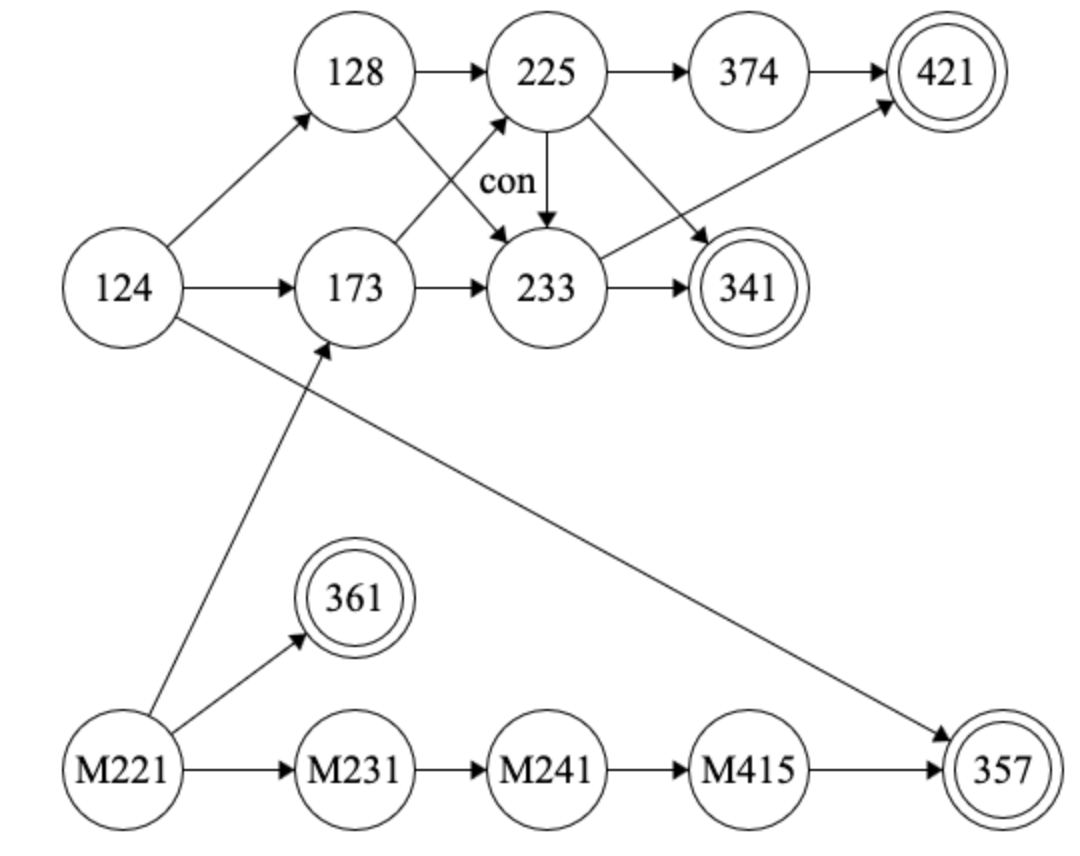
<p>Everything should be free unless I tag it with <strong>Paid</strong>. If it’s paid, it’s not an affiliate link.</p>

<h2 id="start-with-basic-ruby">Start With Basic Ruby</h2>

<p>Rails uses Ruby heavily, and before doing any Rails I highly recommend starting with a cursory understanding of Ruby.</p>

<p><a href="https://try.ruby-lang.org/">Try Ruby</a></p>

<p>15-30 minute in-browser introduction to Ruby with some interactive exercises.</p>

<p><a href="https://learnxinyminutes.com/ruby">Learn X in Y minutes</a></p>

<p>Quick syntax reference for various aspects of Ruby. After a while you might not look at this as much, but it’s a great starter.</p>

<p>You don’t need to be an expert in Ruby before starting Rails, but definitely take the time to eventually learn the language well if you’re planning to use Rails for some time.</p>

<h2 id="new-to-programming">New to Programming</h2>

<p><a href="https://pine.fm/LearnToProgram/">Learn to Program by Chris Pine</a></p>

<p>If you’re new to programming in general, I highly recommend Chris Pine’s short book. This is how I really got into programming myself when I was 12. It builds up basic programming concepts in a nice chapter-by-chapter format and has great exercises.</p>

<h2 id="installing-rails">Installing Rails</h2>

<p>Installing Rails has always been an ordeal, and my go-to guide has always been:</p>

<p><a href="https://gorails.com/setup/ubuntu/26.04">Go Rails Install Guides</a></p>

<p>Select your OS and version, and it’ll apply the right template for installing Rails and all the moving parts it needs.</p>

<p>Once you have it working, newer Rails versions come with an idempotent install script called <code class="language-plaintext highlighter-rouge">bin/setup</code> that can be used to install or refresh your Rails setup.</p>

<h2 id="quick-dive-into-rails">Quick Dive Into Rails</h2>

<p>Rails is a <em>huge</em> framework that’s famous for being batteries-included for basically every baseline web development need. It’s a lot to take in, and in my experience it takes months before someone is broadly fluent in the whole thing. The best way to learn is to take a quick tour of the core concepts Rails offers, and then learn more in later passes based on what your project needs.</p>

<p><a href="https://guides.rubyonrails.org/getting_started.html">Official Rails Getting Started Guide</a></p>

<p>I’ve contributed to many sections here so I might be a little biased, but it’s a great intro tour of major Rails features.</p>

<p><a href="https://guides.railsgirls.com/start">Rails Girls Guide</a></p>

<p>It’s not too recently updated, but I think the chapters cover broad concepts quite well.</p>

<h2 id="new-to-frontend">New to Frontend</h2>

<p><a href="https://freecodecamp.org/learn">freecodecamp.com/learn</a></p>

<p>You don’t need extensive frontend knowledge to use Rails well, but if you don’t have much of a background, try FreeCodeCamp’s in-browser exercises that build up HTML, CSS, and JavaScript really well. This is how I picked up a solid foundation after years of Swiss-cheese knowledge.</p>

<h2 id="frontend-frameworks">Frontend Frameworks</h2>

<p>Rails started with a model of embedded Ruby and sending HTML over the wire, but it’s also popular to use it with a frontend framework. Here’s an example for React with Rails 7:</p>

<p><a href="https://thoughtbot.com/blog/how-to-integrate-react-rails">How to integrate React with Rails 7</a></p>

<h2 id="rails-philosophy">Rails Philosophy</h2>

<p>Rails has a very opinionated philosophy on how to develop and why it is the way it is. You must have already noticed in the tutorials so far, but if you’re this far, you should definitely understand the underlying principles.</p>

<p><a href="https://rubyonrails.org/doctrine">The Rails Doctrine</a></p>

<p><a href="https://blog.codeminer42.com/an-introduction-to-ruby-on-rails-from-someone-with-a-frontend-background/">An Introduction to Ruby on Rails – From someone with a frontend background by Luiz Felipe Diniz</a></p>

<p>This post is also an interesting take from someone coming in with a frontend background.</p>

<h2 id="deeper-dives">Deeper Dives</h2>

<p>Now that you have the basics down, there’s no fixed order for the rest. Learn more based on your curiosity and what you need.</p>

<h3 id="rails">Rails</h3>

<p><a href="https://www.railstutorial.org/">Michael Hartl’s Ruby on Rails Tutorial</a> - <strong>PAID</strong></p>

<p>I highly recommend this long book that walks through several Rails applications with increasing levels of complexity, along with software best practices. It peels back a lot of layers that Rails generators usually handle, and you’ll have more confidence to build your own stuff by then.</p>

<p>This book is how I went from a programmer to a software engineer. It took me more education and work experience to get to where I am today, but this book was my proper start.</p>

<h3 id="ruby">Ruby</h3>

<p><a href="https://poignant.guide/">poignant.guide</a></p>

<p>Why’s Poignant Guide to Ruby is a cute and quirky book that dives deeper into Ruby and its language design, with lots of nice illustrations.</p>

<p>I actually have this one in print from a limited-edition run. I don’t know if there are still any runs around.</p>

<h3 id="ruby-style-object-oriented-programming">Ruby-Style Object-Oriented Programming</h3>

<p>While you’ve probably worked with other OOP languages before, Ruby takes a certain message-passing purist approach to it. Until I read all of this myself, I never fully appreciated why it’s such a powerful paradigm and why Ruby is uniquely well-suited to it.</p>

<p>I think Sandy Metz writes about it the best:</p>

<p><a href="https://thoughtbot.com/blog/sandi-metz-rules-for-developers">Sandi Metz’ Rules For Developers</a></p>

<p>Four rules for Rails code. It’s a broad heuristic, but it goes surprisingly far in helping you think through object design, relationships, and how objects call each other well.</p>

<p><a href="https://www.poodr.com/">Practical Object Oriented Design in Ruby (POODR)</a> - <strong>PAID</strong></p>

<p>This dives deep into object-oriented programming ideas and how to use them to create readable, flexible code. While I wasn’t new to the principles in the book, it really helped me embrace the <em>why</em> and <em>how</em>.</p>

<h3 id="rails-guides">Rails Guides</h3>

<p>Rails officially has lots of guides across a broad variety of topics. It doesn’t have everything, but it’s a great starting point when you want to learn more about specific areas. Besides the Getting Started Guide, where I’ve contributed a lot, you might spot some of my other contributions:</p>

<p><a href="https://guides.rubyonrails.org/">Ruby on Rails Guides</a></p>

<h3 id="the-two-rails-stacks-coreomakase-vs-prime">The Two Rails Stacks: Core/Omakase vs Prime</h3>

<p>As you go further in the Rails community, you’ll encounter a popular set of alternative defaults adopted by many Rails projects. The exact stack has changed over the years, but it’s common to see:</p>

<ul>
  <li>RSpec over minitest for testing</li>
  <li>FactoryBot over Fixtures for test data</li>
  <li>A service layer for business logic instead of putting more logic in models/controllers</li>
  <li>Frontend frameworks like React instead of Embedded Ruby with Hotwire</li>
</ul>

<p>I recommend sticking with the Rails Core/Omakase defaults initially since it’s more intimidating to learn both at once, but learning these eventually is worthwhile. If you’re joining a pre-existing Rails project, you’re likely to see some of these Prime stack choices.</p>

<p>These two blog posts from a while ago capture the split well. It’s interesting how much stays the same.</p>

<p><a href="https://steveklabnik.com/writing/rails-has-two-default-stacks/">Rails Has Two Default Stacks -  Steve Klabnik</a></p>

<p><a href="https://medium.com/table-xi/rails-core-stack-and-rails-prime-stack-f0e18442348b">Rails Core Stack and Rails Prime Stack - Noel Rappin</a></p>]]></content><author><name>Harsh Deep</name></author><category term="Info" /><summary type="html"><![CDATA[Curated links and a suggested order to follow. Everything should be free unless I tag it with Paid. If it’s paid, it’s not an affiliate link. Start With Basic Ruby Rails uses Ruby heavily, and before doing any Rails I highly recommend starting with a cursory understanding of Ruby. Try Ruby 15-30 minute in-browser introduction to Ruby with some interactive exercises. Learn X in Y minutes Quick syntax reference for various aspects of Ruby. After a while you might not look at this as much, but it’s a great starter. You don’t need to be an expert in Ruby before starting Rails, but definitely take the time to eventually learn the language well if you’re planning to use Rails for some time. New to Programming Learn to Program by Chris Pine If you’re new to programming in general, I highly recommend Chris Pine’s short book. This is how I really got into programming myself when I was 12. It builds up basic programming concepts in a nice chapter-by-chapter format and has great exercises. Installing Rails Installing Rails has always been an ordeal, and my go-to guide has always been: Go Rails Install Guides Select your OS and version, and it’ll apply the right template for installing Rails and all the moving parts it needs. Once you have it working, newer Rails versions come with an idempotent install script called bin/setup that can be used to install or refresh your Rails setup. Quick Dive Into Rails Rails is a huge framework that’s famous for being batteries-included for basically every baseline web development need. It’s a lot to take in, and in my experience it takes months before someone is broadly fluent in the whole thing. The best way to learn is to take a quick tour of the core concepts Rails offers, and then learn more in later passes based on what your project needs. Official Rails Getting Started Guide I’ve contributed to many sections here so I might be a little biased, but it’s a great intro tour of major Rails features. Rails Girls Guide It’s not too recently updated, but I think the chapters cover broad concepts quite well. New to Frontend freecodecamp.com/learn You don’t need extensive frontend knowledge to use Rails well, but if you don’t have much of a background, try FreeCodeCamp’s in-browser exercises that build up HTML, CSS, and JavaScript really well. This is how I picked up a solid foundation after years of Swiss-cheese knowledge. Frontend Frameworks Rails started with a model of embedded Ruby and sending HTML over the wire, but it’s also popular to use it with a frontend framework. Here’s an example for React with Rails 7: How to integrate React with Rails 7 Rails Philosophy Rails has a very opinionated philosophy on how to develop and why it is the way it is. You must have already noticed in the tutorials so far, but if you’re this far, you should definitely understand the underlying principles. The Rails Doctrine An Introduction to Ruby on Rails – From someone with a frontend background by Luiz Felipe Diniz This post is also an interesting take from someone coming in with a frontend background. Deeper Dives Now that you have the basics down, there’s no fixed order for the rest. Learn more based on your curiosity and what you need. Rails Michael Hartl’s Ruby on Rails Tutorial - PAID I highly recommend this long book that walks through several Rails applications with increasing levels of complexity, along with software best practices. It peels back a lot of layers that Rails generators usually handle, and you’ll have more confidence to build your own stuff by then. This book is how I went from a programmer to a software engineer. It took me more education and work experience to get to where I am today, but this book was my proper start. Ruby poignant.guide Why’s Poignant Guide to Ruby is a cute and quirky book that dives deeper into Ruby and its language design, with lots of nice illustrations. I actually have this one in print from a limited-edition run. I don’t know if there are still any runs around. Ruby-Style Object-Oriented Programming While you’ve probably worked with other OOP languages before, Ruby takes a certain message-passing purist approach to it. Until I read all of this myself, I never fully appreciated why it’s such a powerful paradigm and why Ruby is uniquely well-suited to it. I think Sandy Metz writes about it the best: Sandi Metz’ Rules For Developers Four rules for Rails code. It’s a broad heuristic, but it goes surprisingly far in helping you think through object design, relationships, and how objects call each other well. Practical Object Oriented Design in Ruby (POODR) - PAID This dives deep into object-oriented programming ideas and how to use them to create readable, flexible code. While I wasn’t new to the principles in the book, it really helped me embrace the why and how. Rails Guides Rails officially has lots of guides across a broad variety of topics. It doesn’t have everything, but it’s a great starting point when you want to learn more about specific areas. Besides the Getting Started Guide, where I’ve contributed a lot, you might spot some of my other contributions: Ruby on Rails Guides The Two Rails Stacks: Core/Omakase vs Prime As you go further in the Rails community, you’ll encounter a popular set of alternative defaults adopted by many Rails projects. The exact stack has changed over the years, but it’s common to see: RSpec over minitest for testing FactoryBot over Fixtures for test data A service layer for business logic instead of putting more logic in models/controllers Frontend frameworks like React instead of Embedded Ruby with Hotwire I recommend sticking with the Rails Core/Omakase defaults initially since it’s more intimidating to learn both at once, but learning these eventually is worthwhile. If you’re joining a pre-existing Rails project, you’re likely to see some of these Prime stack choices. These two blog posts from a while ago capture the split well. It’s interesting how much stays the same. Rails Has Two Default Stacks - Steve Klabnik Rails Core Stack and Rails Prime Stack - Noel Rappin]]></summary></entry><entry><title type="html">Floats Don’t Work For Storing Cents Why Modern Treasury Uses Integers Instead</title><link href="https://harsh183.com/floats-dont-work-currency" rel="alternate" type="text/html" title="Floats Don’t Work For Storing Cents Why Modern Treasury Uses Integers Instead" /><published>2025-08-06T00:00:00+00:00</published><updated>2025-08-06T00:00:00+00:00</updated><id>https://harsh183.com/floats-dont-work-currency</id><content type="html" xml:base="https://harsh183.com/floats-dont-work-currency"><![CDATA[<p>Pretty much everywhere in my field of finance uses some kind of fixed-point representation for good reason. I was wondering about that one day and decided to explore all the things you need to account for when trying to store money in floats.</p>

<p><a href="https://www.moderntreasury.com/journal/floats-dont-work-for-storing-cents">https://www.moderntreasury.com/journal/floats-dont-work-for-storing-cents</a></p>

<p>Basically, lots of things go wrong because of the many quirks of IEEE-754, lossy formatting, and various rounding modes. Please use integers, BigDecimal/BigNumber, or even strings instead.</p>]]></content><author><name>Harsh Deep</name></author><category term="Info" /><summary type="html"><![CDATA[Pretty much everywhere in my field of finance uses some kind of fixed-point representation for good reason. I was wondering about that one day and decided to explore all the things you need to account for when trying to store money in floats. https://www.moderntreasury.com/journal/floats-dont-work-for-storing-cents Basically, lots of things go wrong because of the many quirks of IEEE-754, lossy formatting, and various rounding modes. Please use integers, BigDecimal/BigNumber, or even strings instead.]]></summary></entry><entry><title type="html">How to Use RxStomp with React Build A Chat App</title><link href="https://harsh183.com/rxstomp-react" rel="alternate" type="text/html" title="How to Use RxStomp with React Build A Chat App" /><published>2024-10-23T00:00:00+00:00</published><updated>2024-10-23T00:00:00+00:00</updated><id>https://harsh183.com/rxstomp-react</id><content type="html" xml:base="https://harsh183.com/rxstomp-react"><![CDATA[<p>A library I contribute to had lots of questions from people asking how to use it with React the right way, including correct Observable cleanup and unsubscribe behavior. There was already something similar for Angular, so I decided to write one for React.</p>

<p><a href="https://www.freecodecamp.org/news/build-chat-app-with-stomp-and-react/">https://www.freecodecamp.org/news/build-chat-app-with-stomp-and-react/</a></p>]]></content><author><name>Harsh Deep</name></author><category term="Info" /><summary type="html"><![CDATA[A library I contribute to had lots of questions from people asking how to use it with React the right way, including correct Observable cleanup and unsubscribe behavior. There was already something similar for Angular, so I decided to write one for React. https://www.freecodecamp.org/news/build-chat-app-with-stomp-and-react/]]></summary></entry><entry><title type="html">Social Media Myths About Fednow</title><link href="https://harsh183.com/fednow-myths" rel="alternate" type="text/html" title="Social Media Myths About Fednow" /><published>2023-07-11T00:00:00+00:00</published><updated>2023-07-11T00:00:00+00:00</updated><id>https://harsh183.com/fednow-myths</id><content type="html" xml:base="https://harsh183.com/fednow-myths"><![CDATA[<p>I wrote about six myths around the highly hyped rollout of FedNow that I saw across social media, on my company blog.</p>

<p><a href="https://www.moderntreasury.com/journal/social-media-myths-about-fednow">https://www.moderntreasury.com/journal/social-media-myths-about-fednow</a></p>]]></content><author><name>Harsh Deep</name></author><category term="Info" /><summary type="html"><![CDATA[I wrote about six myths around the highly hyped rollout of FedNow that I saw across social media, on my company blog. https://www.moderntreasury.com/journal/social-media-myths-about-fednow]]></summary></entry><entry><title type="html">Staying Productive</title><link href="https://harsh183.com/productive" rel="alternate" type="text/html" title="Staying Productive" /><published>2020-05-28T00:00:00+00:00</published><updated>2020-05-28T00:00:00+00:00</updated><id>https://harsh183.com/productive</id><content type="html" xml:base="https://harsh183.com/productive"><![CDATA[<!-- markdownlint-disable MD004 MD009 MD014 MD024 MD031 MD040 -->

<p>Advice on this is complicated to give:</p>
<ul>
  <li>Productivity is hard</li>
  <li>Everyone is different</li>
  <li>When some things are <em>optional</em>, like side projects or life improvements, all the usual barriers can become even more daunting.</li>
</ul>

<p>There’s no single good approach. What works is experimenting with lots of good approaches and finding the few that work for you. I’m going to list many of them briefly here, and it will take some time to figure out what works for you.</p>

<p>Before trying any of these, start by disregarding one-size-fits-all models of productivity. Most self-help advice takes simplistic, standardized ideas of getting work done and often tangles them with shame. Not all of it is bad, and a few excellent resources do have nuanced advice. I’ve linked some at the end of this page, but only a small fraction of advice out there is actually worth reading. Hopefully this is one of them.</p>

<p>With any of these sections, try it for some time before writing it off. Two weeks is a good rule of thumb, but feel free to adjust based on your best judgment. There will be an adjustment period when you try anything new, but you should be able to tell fairly quickly after that if something actually works.</p>

<p>It’s also important to realize there’s no shame if a section doesn’t work for you. As you try and drop things, you might feel pretty negative at first, but it’ll fade as you experiment more and start seeing these as a box of tools you’re filtering through.</p>

<p>You’ll likely need a combo of many strategies that’s unique to you, so keep experimenting with strategies and their combinations. It might take a while until you’re fully at your peak, but even the journey there will start improving things early. You might read this list (and others out there) and realize you’re already doing some of these well; start with that.</p>

<p>Never forget: always be kind to yourself. It’s an introspective process and many parts can get uncomfortable.</p>

<h2 id="time-of-the-day">Time of the Day</h2>

<p>Some people work better in the morning, some in the evening, and some are exclusively night owls. Try different times and schedule productivity around what works for you. Sometimes different tasks also work better at different times of day, and as you figure that out, you can broadly set up daily schedules.</p>

<h2 id="days-of-the-week">Days of the Week</h2>

<p>Some people work better on weekdays, and some on weekends. Some work better with the week’s deadlines nearby, and others like being farther from deadline pressure. What works for you might vary, but experimenting with days of the week is worth it.</p>

<h2 id="together-or-spread">Together or Spread</h2>

<p>Some people are far more productive doing large chunks of work in one go; others like interleaving with other tasks or doing a bit each day. There isn’t a fixed answer, and there’s lots of variation between these two, but try to figure out intervals that work for you. You can also have a hybrid approach where you do maybe six 50-minute work blocks with 10-minute breaks, twice a week, getting the best of both worlds.</p>

<h2 id="pomodoros">Pomodoros</h2>

<p>The idea is that you use 25-minute timers with 5-15 minute breaks in between. It’s named after tomato-shaped kitchen timers. People like the structure and clear time blocks, but others find it limiting or the pauses unnatural.</p>

<p>Some people only use it to gain momentum, using the Pomodoro clock for the initial stages and then continuing once they have momentum. Many others use it to prevent burnout because they want to stay productive throughout the day.</p>

<p>Some people even like getting a real kitchen clock that could even have a ticking noise. The tomato look is a classic but finding another cute one can be pretty helpful.</p>

<p>There are timing variations too. Some people like short bursts while others prefer longer blocks. Here are some popular ones:</p>
<ul>
  <li>45 minutes of work - 15 minutes of break</li>
  <li>50 minutes of work - 10 minutes of break (my personal favorite)</li>
  <li>60 minutes of work - 15 minutes of break</li>
  <li>75 minutes of work - 15 minutes of break</li>
</ul>

<p>These are all roughly in the 5:1 work to break ratio but that’s just a convention that works for many people and aligns with our 60 minute hours, but definitely think about experimenting on what works for you. If 60 minutes of work and 30 minutes of break works better, go for it. Check this post on <a href="https://til.andrew-quinn.me/posts/pomodoros-and-leverage-ratios/">pomodoro leverage ratios</a> which thinks about this aspect more.</p>

<h2 id="goal-setting">Goal Setting</h2>

<p>The idea is that you set fixed goals for specific time bounds that help you get things done. A popular convention is SMART goals.</p>

<ul>
  <li>Specific - you set a clear end deliverable that can be met instead of some vague idea of a result. Starting with a vague idea is fine but quickly distill down to something more specific. Vague goals make it harder to start.</li>
  <li>Measurable - you can tell if you achieved it. If you can’t measure, it will be more intimidating and would lower your productivity.</li>
  <li>Achievable - don’t set yourself up for failure or aim too high. Some goals you can do within the constraints of today (not what future you can do after years of learning). Sometimes you can set a stretch goal and make sure your main goal is reasonably achievable, and the stretch goal is nice to have. Having achievable goals helps you get started and retain momentum.</li>
  <li>Relevant - what you’re aiming to do is something that actively helps towards the overall task you’re trying to do. Treat your productivity as a scarce resource that you will value, so you should ask if a task is worth your time. If you have an MVP already in place, it will help you figure out what is relevant and what is not.</li>
  <li>Timely - this is probably the most important. You need a finite and <em>fixed</em> time bound on a task. Software can be hard to estimate at times, but we still have to learn to give reasonable estimates despite that, and developing this skill helps both you and others.</li>
</ul>

<p>Here is an example: “I will create a sign up button (measurable) that links to my backend <code class="language-plaintext highlighter-rouge">register</code> function (specific and achievable) which I need for creating user accounts (relevant and possibly linked to an MVP) within the next 50 minutes (timely).”</p>

<p>Over time you’ll figure out your own form of goal setting, but I suspect you’ll share a few core ideas with this. I don’t think it’s effective when someone else does this for you, like <a href="https://softwareengineering.stackexchange.com/questions/28927/are-smart-goals-useful-for-programmers">corporate upper management</a>; it works best when you set them up yourself. It’s a rule of thumb, and you’ll learn when it works and when it doesn’t.</p>

<p>This often pairs well with Pomodoro-style working due to the time bound nature of this strategy.</p>

<h2 id="social-productivitybody-doubling">Social Productivity/Body Doubling</h2>

<p>Sometimes doing things alone is enough (and for some people, it works better), so it’s also worth experimenting with a crowd you like working around:</p>

<ul>
  <li>public places like coffee shops and campus hang out areas</li>
  <li>quiet sections of a library without ambient noise</li>
  <li>virtually (especially with the pandemic), websites like <a href="https://focusmate.com/">focusmate</a> (stranger pair-ups for 50-minute sessions)</li>
  <li>pair up with friends and see each other’s to-do lists with timers using a website or chats</li>
</ul>

<p>In the end, many still work best alone, but this is effective for most people. It’s often part of why workplaces exist and colleges have so many study spaces, even when people aren’t collaborating 100% of the time.</p>

<h2 id="social-encouragement">Social Encouragement</h2>

<p>It’s sometimes helpful to have people compare progress and encourage each other, and this can take many forms at both the goal-setting and achievement stages:</p>
<ul>
  <li>broad lists that cover something like a day, week, or month as a summary of goals</li>
  <li>short lists of what can happen over a small time block like a pomodoro</li>
</ul>

<p>There is a lot of variation on this end, but this can have some pretty strong gains.</p>

<h2 id="small-setup-time-followed-by-a-fixed-break">Small Setup Time Followed By a Fixed Break</h2>

<p>Sometimes, when you don’t feel like starting a task right away, do a quick 2-5 minute setup step and then start after a fixed break. This works surprisingly well in practice because the hardest part is often the inertia of starting, not doing the task itself.</p>

<p>Having a little work started and reducing the friction of getting back to work counteracts that inertia to a large extent. Procrastination is often a result of having an unclear starting point, but doing setup separately can break that while only taking a few minutes.</p>

<p>For example, if I don’t feel like programming right now, I can quickly open up <code class="language-plaintext highlighter-rouge">VSCode</code> with my terminal and project ready. Then I set a 15-minute timer where I can still chill, and then get started.</p>

<h2 id="2-minute-rule">2 Minute Rule</h2>

<p>Instead of aiming to do the whole task at once, your goal is to do two minutes of work. You can even count 1 to 120 in your head if you need to. After 2 minutes, you might realize it’s not that bad and keep going, or decide it’s too overwhelming right now and try another 2 minutes later.</p>

<p>For me, I end up continuing about 80% of the time, but your results may vary. The most important thing is that even a low success rate is worth it because either outcome is fine, and odds are you’ll keep doing the task. The underlying principle is that starting is the hardest part, and continuing gets easier. It’s like jumping into a seemingly cold swimming pool and realizing after a minute or two that it’s pretty alright.</p>

<p>This strategy pairs well with the setup idea above because your 2 minutes can be setup. Even if you walk away, the work you did in those 2 minutes makes it easier to come back.</p>

<h2 id="have-high-quality-breaks">Have High-Quality Breaks</h2>

<p>A lot of productivity advice is centered around working, but having good breaks is just as important. Many people think they shouldn’t have breaks or believe that breaks are something to be ashamed of. Not all breaks are alike, and you’ll have some breaks that you like more than others. It might seem counter-intuitive but try to find as <em>high</em>-quality breaks as you can. Higher quality breaks will often end up being shorter, more satisfying, and make you more productive. Many people try to shame themselves or treat a break as some reward but it’s better to reframe it as part of the productive process.</p>

<p>For instance, I might find a 15-minute call with a friend far more likable than an hour scrolling through social media. Or it might be more fun to do a walk or even a short exercise.</p>

<h2 id="schedule-recurring-no-work-times">Schedule Recurring No Work Times</h2>

<p>Like the previous point, I find it useful to actively block out periods of time where you will not be doing any work. It could be a day, a few hours, or even a few minutes spread over the day. In this slot, you have to take a break and not work at all. Regardless of how the day is going, you get guilt-free no-work time.</p>

<p>If you treat your non-work time as sacred, you may find it easier to keep your work time sacred too. It sounds counterintuitive to write off large blocks of time as unproductive, but doing this ensures the productive time left is far higher quality. On average, this can leave things better overall, especially for long-term productivity as you reduce burnout.</p>

<p>There’s no clear agreement on how long that time slot should be, and it often varies by person. Some like having a fixed set of hours in the day clearly blocked off; others like blocking off a full day or so. As a starting point, try at least one clear day a week, and if you’d prefer a daily version, at least an hour a day.</p>

<h2 id="todo-lists">Todo Lists</h2>

<p>Some people find it overwhelming just to keep track of what needs to be done, and keeping it all in their head can get exhausting. Having an external to-do list is helpful since the cognitive load is pushed onto technology or paper. You can use this to split big intimidating tasks into smaller, friendlier tasks as well. Some people like the motivation from sharing these or checking off items. Many sites have gamified to-do lists like Habitica.</p>

<p>This combines with SMART goals well too.</p>

<h2 id="additional-deadlines">Additional Deadlines</h2>

<p>Deadlines are great, and it’s perfectly fine to use them to your advantage. In general, if deadlines are what works best for you, then you can even create artificial ones. Some people can set that up for themselves, while others need external enforcers: both are perfectly fine.</p>

<p>For example, if you have a big project due at the end of a month, schedule a weekly call with a professor or manager where you’ll show stages of your progress. You might think you’re an inconvenience, but most people are glad to support efforts like this. Many people never take the initiative to ask, and there’s almost nothing to lose. Sometimes you’ll even get pointers.</p>

<h2 id="additional-consequences">Additional Consequences</h2>

<p>Hitting productive goals can come with a reward depending on the goal size and the effort you took. Most of these you can arrange for yourself, though you might find your peers are happy to help in lots of small ways.</p>

<p>Some people prefer a slight negative consequence, like money on the line that will be lost or donated to charity. Negative loops can be a slippery slope, but used in a light-hearted way they can be effective.</p>

<h2 id="mental-health-and-undiagnosed-issues">Mental Health and Undiagnosed Issues</h2>

<p>I am not qualified to give specific advice on this, but this is something that trips up surprisingly many people, and some attention plus specific help can go a long way. If you suspect something or have an untreated issue, definitely consult qualified experts who can help you improve many aspects of life, including productivity.</p>

<h2 id="sleep-food-and-quality-of-life">Sleep, Food, and Quality of Life</h2>

<p>In general, try to keep your quality of life and health factors as good as practically possible. Trying to sacrifice those for productivity doesn’t really work short-term and mostly doesn’t work long-term either (even if you think it does). Sometimes, these issues are hard to fix, but even a 20% improvement in some quality of life factors can significantly affect your productivity. You don’t need to be the pinnacle of health, but any progress there will also help your productive life.</p>

<h2 id="iteration-over-perfectionism">Iteration over Perfectionism</h2>

<p>“Perfect is the enemy of done” <a href="https://en.wikiquote.org/wiki/Perfection">(origin disputed)</a>.</p>

<p>When things are not going well, your brain will often set very high and unrealistic starting goals. It may not even let you get started, since you’ll aim for perfection right away instead of getting there through iterations. People might think this thought process leads to good results, but it rarely does. Instead, you start imperfectly, feel confused sometimes, go back and forth, erase some work, experiment, and keep refining what you’re doing. This workflow will get you far closer to great outcomes than perfectionism at the start.</p>

<p>To quote <a href="http://www.paulgraham.com/hp.html">Paul Graham’s Hackers and Painters</a>,</p>

<blockquote>
  <p>I was taught in college that one ought to figure out a program completely on paper before even going near a computer. I found that I did not program this way. I found that I liked to program sitting in front of a computer, not a piece of paper. Worse still, instead of patiently writing out a complete program and assuring myself it was correct, I tended to just spew out code that was hopelessly broken, and gradually beat it into shape. Debugging, I was taught, was a kind of final pass where you caught typos and oversights. The way I worked, it seemed like programming consisted of debugging.</p>

  <p>For a long time I felt bad about this, just as I once felt bad that I didn’t hold my pencil the way they taught me to in elementary school. If I had only looked over at the other makers, the painters or the architects, I would have realized that there was a name for what I was doing: sketching. As far as I can tell, the way they taught me to program in college was all wrong. You should figure out programs as you’re writing them, just as writers and painters and architects do.</p>
</blockquote>

<h2 id="non-zero-days">Non-Zero Days</h2>

<p>This point and the next one are inspired by this <a href="https://www.reddit.com/r/getdisciplined/comments/1q96b5/i_just_dont_care_about_myself/cdah4af/">famous Reddit comment</a>.</p>

<p>The idea is that you’ll have days where things go wrong, days where nothing happens, and your entire to-do list feels like a reminder of how worthless you are.</p>

<p>On those days, before the day is over, do a <em>tiny</em> amount of non-zero work. Read a <em>single</em> page of a book, write a <em>single</em> line of code, add a <em>single</em> test case, do a <em>single</em> push up, or whatever. Anything that is not zero. Your ideal productive self won’t appear right away (as much as we wish), but from a series of non-zero days that slowly add up. Even if you’re not doing well, at least you can break the negative streak and give yourself a fresh start.</p>

<h2 id="forgiveness">Forgiveness</h2>

<p>No matter how hard you try, things will not go as well as you expect. That’s fine.</p>

<p>Always forgive yourself. If you want, I, Harsh Deep, will forgive you too. Maybe you had the skills you needed, and perhaps you had something unexpectedly go wrong. Perhaps you can’t come up with a reason at all. Everything is going to be okay.</p>

<p>The past is gone, and forgiving yourself pushes you towards creating a better tomorrow. Being stuck there is a spiral that only drags you down, and life is too short for that. This is easy advice to give but hard to follow. I promise it’s worthwhile, though.</p>

<h2 id="motivation">Motivation</h2>

<p>And finally, motivation. This one is tricky because it’s often what people blame first when they’re not able to work, but usually a large variety of factors are the real problem. Motivation is also a complex emotion with many types and ways to build it. It certainly helps to have something pulling you forward, figure out your style, identify what is blocking you, and work specifically to remove blockers.</p>

<h2 id="good-luck">Good luck</h2>

<p>Productivity is complicated, and honestly, no one has completely figured it out yet. Over time you will arrive at what works for you, but don’t beat yourself up over it or try to be a perfectionist about it.</p>

<p>You got this!</p>

<h2 id="see-more">See More</h2>

<ul>
  <li>
    <p><a href="https://www.youtube.com/watch?v=LO1mTELoj6o">7 Ways to Maximize Misery 😞</a> - good call outs with specific advice</p>
  </li>
  <li>
    <p><a href="https://www.goodreads.com/book/show/36121202-how-to-be-a-study-ninja">How to be a Study Ninja: Study smarter. Focus better. Achieve more.</a> - I was <em>extremely</em> skeptical about this book (and the entire genre), but it has a lot of specific, realistic, and practical advice with a toolbox approach to productivity. Some approaches might work, some might not, but it’s worth experimenting and potentially getting huge gains in results.</p>
  </li>
</ul>

<p>Thanks to Nehal Sai Tangudu for proof reading and providing feedback on an earlier <a href="https://sosp22.com/productive">version</a> of the post.</p>]]></content><author><name>Harsh Deep</name></author><category term="Info" /><summary type="html"><![CDATA[Advice on this is complicated to give: Productivity is hard Everyone is different When some things are optional, like side projects or life improvements, all the usual barriers can become even more daunting. There’s no single good approach. What works is experimenting with lots of good approaches and finding the few that work for you. I’m going to list many of them briefly here, and it will take some time to figure out what works for you. Before trying any of these, start by disregarding one-size-fits-all models of productivity. Most self-help advice takes simplistic, standardized ideas of getting work done and often tangles them with shame. Not all of it is bad, and a few excellent resources do have nuanced advice. I’ve linked some at the end of this page, but only a small fraction of advice out there is actually worth reading. Hopefully this is one of them. With any of these sections, try it for some time before writing it off. Two weeks is a good rule of thumb, but feel free to adjust based on your best judgment. There will be an adjustment period when you try anything new, but you should be able to tell fairly quickly after that if something actually works. It’s also important to realize there’s no shame if a section doesn’t work for you. As you try and drop things, you might feel pretty negative at first, but it’ll fade as you experiment more and start seeing these as a box of tools you’re filtering through. You’ll likely need a combo of many strategies that’s unique to you, so keep experimenting with strategies and their combinations. It might take a while until you’re fully at your peak, but even the journey there will start improving things early. You might read this list (and others out there) and realize you’re already doing some of these well; start with that. Never forget: always be kind to yourself. It’s an introspective process and many parts can get uncomfortable. Time of the Day Some people work better in the morning, some in the evening, and some are exclusively night owls. Try different times and schedule productivity around what works for you. Sometimes different tasks also work better at different times of day, and as you figure that out, you can broadly set up daily schedules. Days of the Week Some people work better on weekdays, and some on weekends. Some work better with the week’s deadlines nearby, and others like being farther from deadline pressure. What works for you might vary, but experimenting with days of the week is worth it. Together or Spread Some people are far more productive doing large chunks of work in one go; others like interleaving with other tasks or doing a bit each day. There isn’t a fixed answer, and there’s lots of variation between these two, but try to figure out intervals that work for you. You can also have a hybrid approach where you do maybe six 50-minute work blocks with 10-minute breaks, twice a week, getting the best of both worlds. Pomodoros The idea is that you use 25-minute timers with 5-15 minute breaks in between. It’s named after tomato-shaped kitchen timers. People like the structure and clear time blocks, but others find it limiting or the pauses unnatural. Some people only use it to gain momentum, using the Pomodoro clock for the initial stages and then continuing once they have momentum. Many others use it to prevent burnout because they want to stay productive throughout the day. Some people even like getting a real kitchen clock that could even have a ticking noise. The tomato look is a classic but finding another cute one can be pretty helpful. There are timing variations too. Some people like short bursts while others prefer longer blocks. Here are some popular ones: 45 minutes of work - 15 minutes of break 50 minutes of work - 10 minutes of break (my personal favorite) 60 minutes of work - 15 minutes of break 75 minutes of work - 15 minutes of break These are all roughly in the 5:1 work to break ratio but that’s just a convention that works for many people and aligns with our 60 minute hours, but definitely think about experimenting on what works for you. If 60 minutes of work and 30 minutes of break works better, go for it. Check this post on pomodoro leverage ratios which thinks about this aspect more. Goal Setting The idea is that you set fixed goals for specific time bounds that help you get things done. A popular convention is SMART goals. Specific - you set a clear end deliverable that can be met instead of some vague idea of a result. Starting with a vague idea is fine but quickly distill down to something more specific. Vague goals make it harder to start. Measurable - you can tell if you achieved it. If you can’t measure, it will be more intimidating and would lower your productivity. Achievable - don’t set yourself up for failure or aim too high. Some goals you can do within the constraints of today (not what future you can do after years of learning). Sometimes you can set a stretch goal and make sure your main goal is reasonably achievable, and the stretch goal is nice to have. Having achievable goals helps you get started and retain momentum. Relevant - what you’re aiming to do is something that actively helps towards the overall task you’re trying to do. Treat your productivity as a scarce resource that you will value, so you should ask if a task is worth your time. If you have an MVP already in place, it will help you figure out what is relevant and what is not. Timely - this is probably the most important. You need a finite and fixed time bound on a task. Software can be hard to estimate at times, but we still have to learn to give reasonable estimates despite that, and developing this skill helps both you and others. Here is an example: “I will create a sign up button (measurable) that links to my backend register function (specific and achievable) which I need for creating user accounts (relevant and possibly linked to an MVP) within the next 50 minutes (timely).” Over time you’ll figure out your own form of goal setting, but I suspect you’ll share a few core ideas with this. I don’t think it’s effective when someone else does this for you, like corporate upper management; it works best when you set them up yourself. It’s a rule of thumb, and you’ll learn when it works and when it doesn’t. This often pairs well with Pomodoro-style working due to the time bound nature of this strategy. Social Productivity/Body Doubling Sometimes doing things alone is enough (and for some people, it works better), so it’s also worth experimenting with a crowd you like working around: public places like coffee shops and campus hang out areas quiet sections of a library without ambient noise virtually (especially with the pandemic), websites like focusmate (stranger pair-ups for 50-minute sessions) pair up with friends and see each other’s to-do lists with timers using a website or chats In the end, many still work best alone, but this is effective for most people. It’s often part of why workplaces exist and colleges have so many study spaces, even when people aren’t collaborating 100% of the time. Social Encouragement It’s sometimes helpful to have people compare progress and encourage each other, and this can take many forms at both the goal-setting and achievement stages: broad lists that cover something like a day, week, or month as a summary of goals short lists of what can happen over a small time block like a pomodoro There is a lot of variation on this end, but this can have some pretty strong gains. Small Setup Time Followed By a Fixed Break Sometimes, when you don’t feel like starting a task right away, do a quick 2-5 minute setup step and then start after a fixed break. This works surprisingly well in practice because the hardest part is often the inertia of starting, not doing the task itself. Having a little work started and reducing the friction of getting back to work counteracts that inertia to a large extent. Procrastination is often a result of having an unclear starting point, but doing setup separately can break that while only taking a few minutes. For example, if I don’t feel like programming right now, I can quickly open up VSCode with my terminal and project ready. Then I set a 15-minute timer where I can still chill, and then get started. 2 Minute Rule Instead of aiming to do the whole task at once, your goal is to do two minutes of work. You can even count 1 to 120 in your head if you need to. After 2 minutes, you might realize it’s not that bad and keep going, or decide it’s too overwhelming right now and try another 2 minutes later. For me, I end up continuing about 80% of the time, but your results may vary. The most important thing is that even a low success rate is worth it because either outcome is fine, and odds are you’ll keep doing the task. The underlying principle is that starting is the hardest part, and continuing gets easier. It’s like jumping into a seemingly cold swimming pool and realizing after a minute or two that it’s pretty alright. This strategy pairs well with the setup idea above because your 2 minutes can be setup. Even if you walk away, the work you did in those 2 minutes makes it easier to come back. Have High-Quality Breaks A lot of productivity advice is centered around working, but having good breaks is just as important. Many people think they shouldn’t have breaks or believe that breaks are something to be ashamed of. Not all breaks are alike, and you’ll have some breaks that you like more than others. It might seem counter-intuitive but try to find as high-quality breaks as you can. Higher quality breaks will often end up being shorter, more satisfying, and make you more productive. Many people try to shame themselves or treat a break as some reward but it’s better to reframe it as part of the productive process. For instance, I might find a 15-minute call with a friend far more likable than an hour scrolling through social media. Or it might be more fun to do a walk or even a short exercise. Schedule Recurring No Work Times Like the previous point, I find it useful to actively block out periods of time where you will not be doing any work. It could be a day, a few hours, or even a few minutes spread over the day. In this slot, you have to take a break and not work at all. Regardless of how the day is going, you get guilt-free no-work time. If you treat your non-work time as sacred, you may find it easier to keep your work time sacred too. It sounds counterintuitive to write off large blocks of time as unproductive, but doing this ensures the productive time left is far higher quality. On average, this can leave things better overall, especially for long-term productivity as you reduce burnout. There’s no clear agreement on how long that time slot should be, and it often varies by person. Some like having a fixed set of hours in the day clearly blocked off; others like blocking off a full day or so. As a starting point, try at least one clear day a week, and if you’d prefer a daily version, at least an hour a day. Todo Lists Some people find it overwhelming just to keep track of what needs to be done, and keeping it all in their head can get exhausting. Having an external to-do list is helpful since the cognitive load is pushed onto technology or paper. You can use this to split big intimidating tasks into smaller, friendlier tasks as well. Some people like the motivation from sharing these or checking off items. Many sites have gamified to-do lists like Habitica. This combines with SMART goals well too. Additional Deadlines Deadlines are great, and it’s perfectly fine to use them to your advantage. In general, if deadlines are what works best for you, then you can even create artificial ones. Some people can set that up for themselves, while others need external enforcers: both are perfectly fine. For example, if you have a big project due at the end of a month, schedule a weekly call with a professor or manager where you’ll show stages of your progress. You might think you’re an inconvenience, but most people are glad to support efforts like this. Many people never take the initiative to ask, and there’s almost nothing to lose. Sometimes you’ll even get pointers. Additional Consequences Hitting productive goals can come with a reward depending on the goal size and the effort you took. Most of these you can arrange for yourself, though you might find your peers are happy to help in lots of small ways. Some people prefer a slight negative consequence, like money on the line that will be lost or donated to charity. Negative loops can be a slippery slope, but used in a light-hearted way they can be effective. Mental Health and Undiagnosed Issues I am not qualified to give specific advice on this, but this is something that trips up surprisingly many people, and some attention plus specific help can go a long way. If you suspect something or have an untreated issue, definitely consult qualified experts who can help you improve many aspects of life, including productivity. Sleep, Food, and Quality of Life In general, try to keep your quality of life and health factors as good as practically possible. Trying to sacrifice those for productivity doesn’t really work short-term and mostly doesn’t work long-term either (even if you think it does). Sometimes, these issues are hard to fix, but even a 20% improvement in some quality of life factors can significantly affect your productivity. You don’t need to be the pinnacle of health, but any progress there will also help your productive life. Iteration over Perfectionism “Perfect is the enemy of done” (origin disputed). When things are not going well, your brain will often set very high and unrealistic starting goals. It may not even let you get started, since you’ll aim for perfection right away instead of getting there through iterations. People might think this thought process leads to good results, but it rarely does. Instead, you start imperfectly, feel confused sometimes, go back and forth, erase some work, experiment, and keep refining what you’re doing. This workflow will get you far closer to great outcomes than perfectionism at the start. To quote Paul Graham’s Hackers and Painters, I was taught in college that one ought to figure out a program completely on paper before even going near a computer. I found that I did not program this way. I found that I liked to program sitting in front of a computer, not a piece of paper. Worse still, instead of patiently writing out a complete program and assuring myself it was correct, I tended to just spew out code that was hopelessly broken, and gradually beat it into shape. Debugging, I was taught, was a kind of final pass where you caught typos and oversights. The way I worked, it seemed like programming consisted of debugging. For a long time I felt bad about this, just as I once felt bad that I didn’t hold my pencil the way they taught me to in elementary school. If I had only looked over at the other makers, the painters or the architects, I would have realized that there was a name for what I was doing: sketching. As far as I can tell, the way they taught me to program in college was all wrong. You should figure out programs as you’re writing them, just as writers and painters and architects do. Non-Zero Days This point and the next one are inspired by this famous Reddit comment. The idea is that you’ll have days where things go wrong, days where nothing happens, and your entire to-do list feels like a reminder of how worthless you are. On those days, before the day is over, do a tiny amount of non-zero work. Read a single page of a book, write a single line of code, add a single test case, do a single push up, or whatever. Anything that is not zero. Your ideal productive self won’t appear right away (as much as we wish), but from a series of non-zero days that slowly add up. Even if you’re not doing well, at least you can break the negative streak and give yourself a fresh start. Forgiveness No matter how hard you try, things will not go as well as you expect. That’s fine. Always forgive yourself. If you want, I, Harsh Deep, will forgive you too. Maybe you had the skills you needed, and perhaps you had something unexpectedly go wrong. Perhaps you can’t come up with a reason at all. Everything is going to be okay. The past is gone, and forgiving yourself pushes you towards creating a better tomorrow. Being stuck there is a spiral that only drags you down, and life is too short for that. This is easy advice to give but hard to follow. I promise it’s worthwhile, though. Motivation And finally, motivation. This one is tricky because it’s often what people blame first when they’re not able to work, but usually a large variety of factors are the real problem. Motivation is also a complex emotion with many types and ways to build it. It certainly helps to have something pulling you forward, figure out your style, identify what is blocking you, and work specifically to remove blockers. Good luck Productivity is complicated, and honestly, no one has completely figured it out yet. Over time you will arrive at what works for you, but don’t beat yourself up over it or try to be a perfectionist about it. You got this! See More 7 Ways to Maximize Misery 😞 - good call outs with specific advice How to be a Study Ninja: Study smarter. Focus better. Achieve more. - I was extremely skeptical about this book (and the entire genre), but it has a lot of specific, realistic, and practical advice with a toolbox approach to productivity. Some approaches might work, some might not, but it’s worth experimenting and potentially getting huge gains in results. Thanks to Nehal Sai Tangudu for proof reading and providing feedback on an earlier version of the post.]]></summary></entry></feed>